
SharePoint archiving with automated retention policies
Squirrel automates both halves of retention for archived SharePoint content. A policy run every night archives files once they pass the age you set, and a retention period, set globally or per sensitivity label, decides how long each archived file is kept in your Azure storage before it is deleted automatically. Administrators set the rules once in the Squirrel portal and they apply to every included site.
Retention means three different things in a SharePoint archiving project, and a buyer needs an answer to each:
| Question | Answered by | How |
|---|---|---|
| What must be kept in Microsoft 365, and for how long? | Microsoft Purview | Retention policies and retention labels |
| When does an inactive file move out of SharePoint? | Squirrel archive policy | Rules on age, size, file type, label, path and site, run every night |
| How long is the archived copy kept? | Squirrel retention settings | A global default, a period per sensitivity label, or never delete |
This page covers the second and third rows for Squirrel, SmiKar's SharePoint archiving product, and how they sit beside the first. For Purview itself, see retention policies vs retention labels in SharePoint.
Archive rules that run every night
Each night Squirrel goes through every included site and archives the files that pass every rule. Nobody has to start it.
| Rule | What it controls | Out of the box |
|---|---|---|
| Site inclusion | Which sites the policy covers. New sites can be included automatically | The sites you include |
| Last Modified | Days since the file was last changed | 730 days (two years) |
| Last Accessed | Days since the file was last opened | Off |
| Per-site thresholds | A longer or shorter clock for one site | Follows the global setting |
| File types at their own age | A chosen file type archived on its own clock, for example video files after 30 days | Your list |
| Minimum file size | Files this size or smaller stay in SharePoint | 10 KB |
| Excluded file types | Extensions that stay in SharePoint, such as .tmp | Your list |
| Excluded sensitivity labels | Files carrying a label you nominate stay in SharePoint | Your list |
| Excluded libraries and paths | A library, a folder or a path pattern stays in SharePoint | Your list |
Three things make the rules safe to change:
- Preview on a site counts the files the current policy would archive and changes nothing.
- Site policies and templates. A site policy overrides the global setting for that site, and a policy template applies one set of rules to a group of sites.
- Changes apply from the next nightly run, to files that are still in SharePoint.
Alongside the nightly run, users can archive a file or folder with the Archive button in SharePoint, and administrators can archive a folder path or a whole site on demand.
Retention periods for archived files
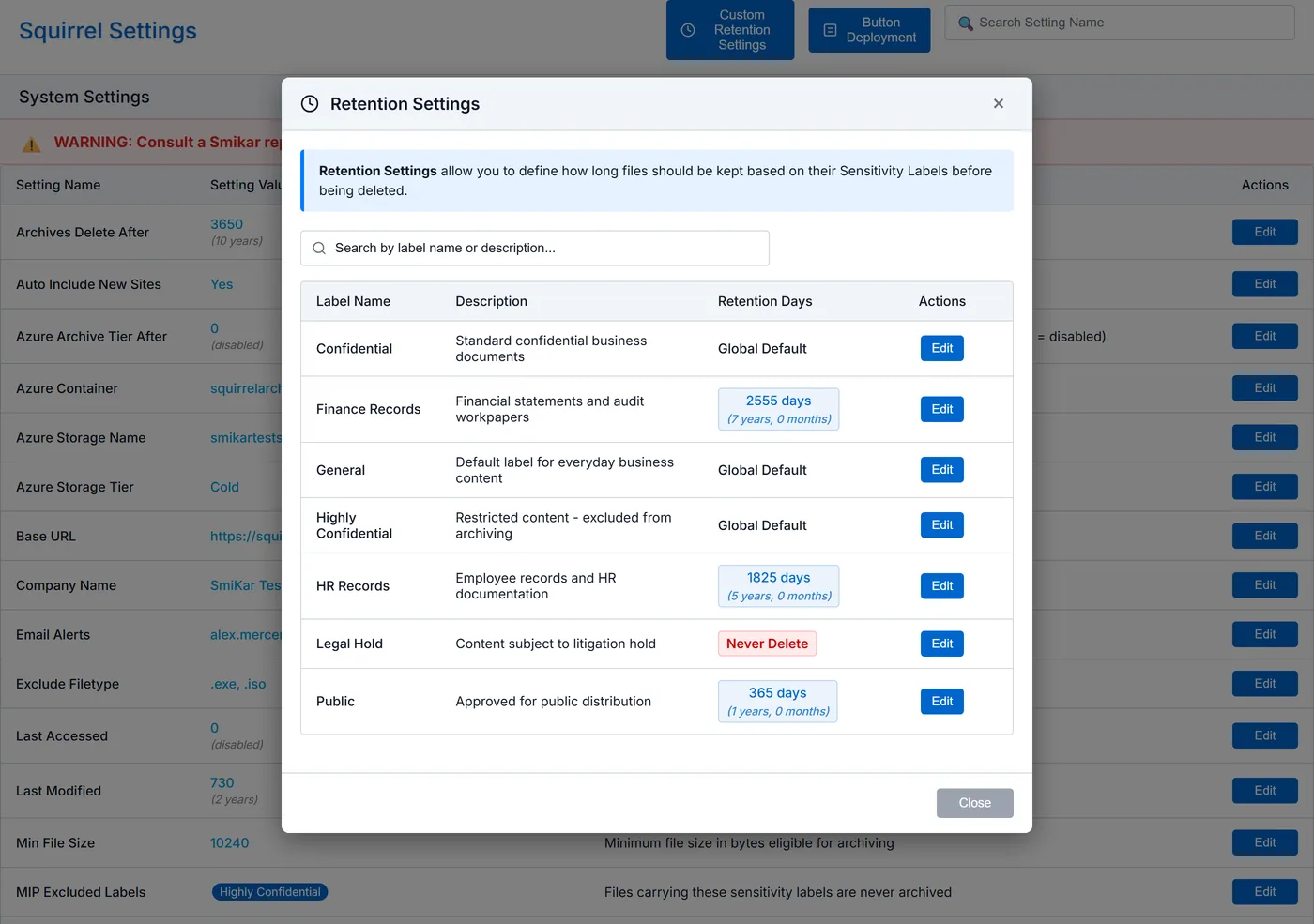
Retention Settings decide how long an archived file stays in your Azure Blob Storage. Each Microsoft sensitivity label in your tenant gets one of three settings:
| Setting | What happens | Use it for |
|---|---|---|
| Global default | The label follows the tenant-wide Archives Delete After setting | Most content |
| Custom days | Archived files with this label are kept for the number of days you enter, then deleted automatically | Content with a set retention period, such as 2,555 days for seven-year financial records |
| Never delete | Archived files with this label are kept indefinitely | Permanent records, and content you may need for a legal matter |
Out of the box the global setting keeps archived files indefinitely. Deletion starts only when you set a period. The portal shows long periods in years and months beside the day count, for example "1825 days (5 years, 0 months)".
| Days | Period |
|---|---|
| 365 | 1 year |
| 730 | 2 years |
| 1,825 | 5 years |
| 2,555 | 7 years |
| 3,650 | 10 years |
When a period ends, the archived file is deleted from your Azure storage automatically. Deletion at the end of a period is permanent, so agree each period with your records or compliance team first. Changes to retention settings are logged with the email address of the administrator who made them.
Storage tier rules
| Setting | What it does |
|---|---|
| Azure Storage Tier | The tier archived files are written to: hot, cool or cold. Cold is the default |
| Azure Archive Tier After | Moves archived files to the Azure Archive tier after the number of days you set |
Versions, orphaned files and deleted files
- Version Limit sets how many versions are archived with each file. The default is 500.
- Orphaned Delete After sets how long archived files whose stub has gone are kept: a period from 120 to 3,650 days, or indefinitely. Each deletion is recorded in the audit trail.
- Recycle Bin Capture preserves the files users delete. After a grace period, seven days by default, Squirrel captures the deleted file into your Azure storage and keeps it for the retention period you set.
How this works with Microsoft Purview retention
Squirrel works alongside active Purview retention policies:
- Squirrel records each file's retention label and sensitivity label when it archives the file.
- Files declared as records are skipped and stay in SharePoint.
- Files carrying a sensitivity label you nominate stay in SharePoint.
- Retention set on a site or a library applies to stubs and to restored files, because both are items in that library.
Where a Purview retention policy covers a site, SharePoint keeps a preserved copy of content removed from a library in the Preservation Hold Library. How to replace the SharePoint Preservation Hold Library explains how Recycle Bin Capture and per-label archive retention can take over that job.
Microsoft also offers its own route: Purview retention archiving for SharePoint moves files under retention into Microsoft 365 Archive. For content under legal hold, see SharePoint archiving and legal hold.
Retention questions to ask any archiving vendor
Use these when you compare SharePoint archiving services. Each has an answer you can test in a proof of concept.
- Do archive rules run on a schedule, or does someone have to start them?
- Can rules differ by site, by file type and by label?
- Can you preview what a rule will archive before it runs?
- Can archived content have its own retention period, and can that differ by classification?
- What happens when the period ends, and are changes to the settings logged?
- What happens to files declared as records?
- Does the archive stay in storage you own?
Squirrel's answer to each is on this page. The SharePoint archiving buyer's checklist has the wider set of tests.
Frequently asked questions
What SharePoint archiving services support automated retention policies?
Squirrel by SmiKar supports them in two layers. Archive policies run every night and move files to your own Azure storage once they pass the age, size, file type and label rules you set. Retention settings then keep each archived file for a period you choose per sensitivity label and delete it automatically at the end. Microsoft Purview provides retention policies and labels for content inside Microsoft 365, and many organizations run both together.
Can different types of content have different retention periods in the archive?
Yes. Each sensitivity label can follow the global default, have its own period in days, or be set to never delete. For example, a finance label can be kept for 2,555 days while general content follows the global default.
Does Squirrel delete archived files automatically?
Only when you set a period. Out of the box archived files are kept indefinitely. Once a global period or a per-label period is set, archived files are deleted from your Azure storage when that period ends.
Can I see what a policy will archive before it runs?
Yes. Preview on a site counts the files the current policy would archive and changes nothing.
How does archive retention relate to Purview retention labels?
They work together. Purview retention policies and labels govern content in Microsoft 365. Squirrel records each file's retention and sensitivity labels at archive time, leaves files declared as records in SharePoint, and applies its own retention period to the archived copy in your Azure storage.
Can I archive some file types sooner than others?
Yes. A file type can be given its own age, counted from the last modified or last accessed date. For example, video files can be archived after 30 days while everything else follows the two-year default.
Next steps
Related reading
- Retention policies vs retention labels in SharePoint - the two Purview retention constructs.
- SharePoint records management and retention in Microsoft 365 - file plans, record labels and disposition review.
- SharePoint archiving best practices for compliance - what a compliant archive has to preserve, including legal hold.
- SharePoint archiving audit trail - the record of every archive and restore.
- SharePoint archiving with easy search and retrieval - how archived files are found and restored.
- How to replace the SharePoint Preservation Hold Library - Recycle Bin Capture in place of preserved copies in SharePoint.
Mark Smith co-founded SmiKar Software in 2015 and has spent the past decade helping organisations solve Microsoft 365 data management challenges. He works with the SmiKar team to build solutions for SharePoint archiving, storage optimisation, governance and compliance, supporting customers from growing businesses through to Fortune 500 enterprises.
More about SmiKar