
Records Management That Can Actually See Your Archive
Most records tools only see live SharePoint. The moment content is archived it drops out of scope: not searchable, not classified, not accounted for. Forage reads both halves of the estate from one inventory, so the archive is governed on the same terms as everything else.
That is what Forage does. It builds its inventory of SharePoint Online files and Squirrel-archived files from the records Squirrel already keeps, opens the archived copies inside your own deployment with your own archive key, reads the documents themselves, and makes the whole estate searchable in one place.
Forage is the records half of Squirrel rather than a separate product, and it requires Squirrel.
See everything. Know what it contains. Account for all of it.
One estate, one search. One full-text search across live and archived content, with highlighted extracts, filters by source and document type, and each file's name and location. The retention and sensitivity labels Squirrel recorded are shown on every result.
Your data stays yours. The text Forage reads, and its search index of that text, stay inside your own deployment. No document content is sent anywhere outside it. Each customer has its own deployment, with its own database and its own search index.
Nothing is left out silently. Every file in the estate is accounted for, whether read, excluded by type or by policy, or failed with a recorded reason. Coverage is reported against the files in the sites you chose, not against a number nobody can reconcile.
Squirrel's records half: archive what's old, then govern all of it.
Squirrel moves cold SharePoint content into your own Azure storage and leaves a stub behind. That solves the cost and the performance problem, but it creates a governance one: content you cannot search is content you cannot answer questions about.
Forage closes that. It reads what Squirrel archived, alongside what is still live, and gives you one place to search it, one account of what has been read, and one record of who looked at what.
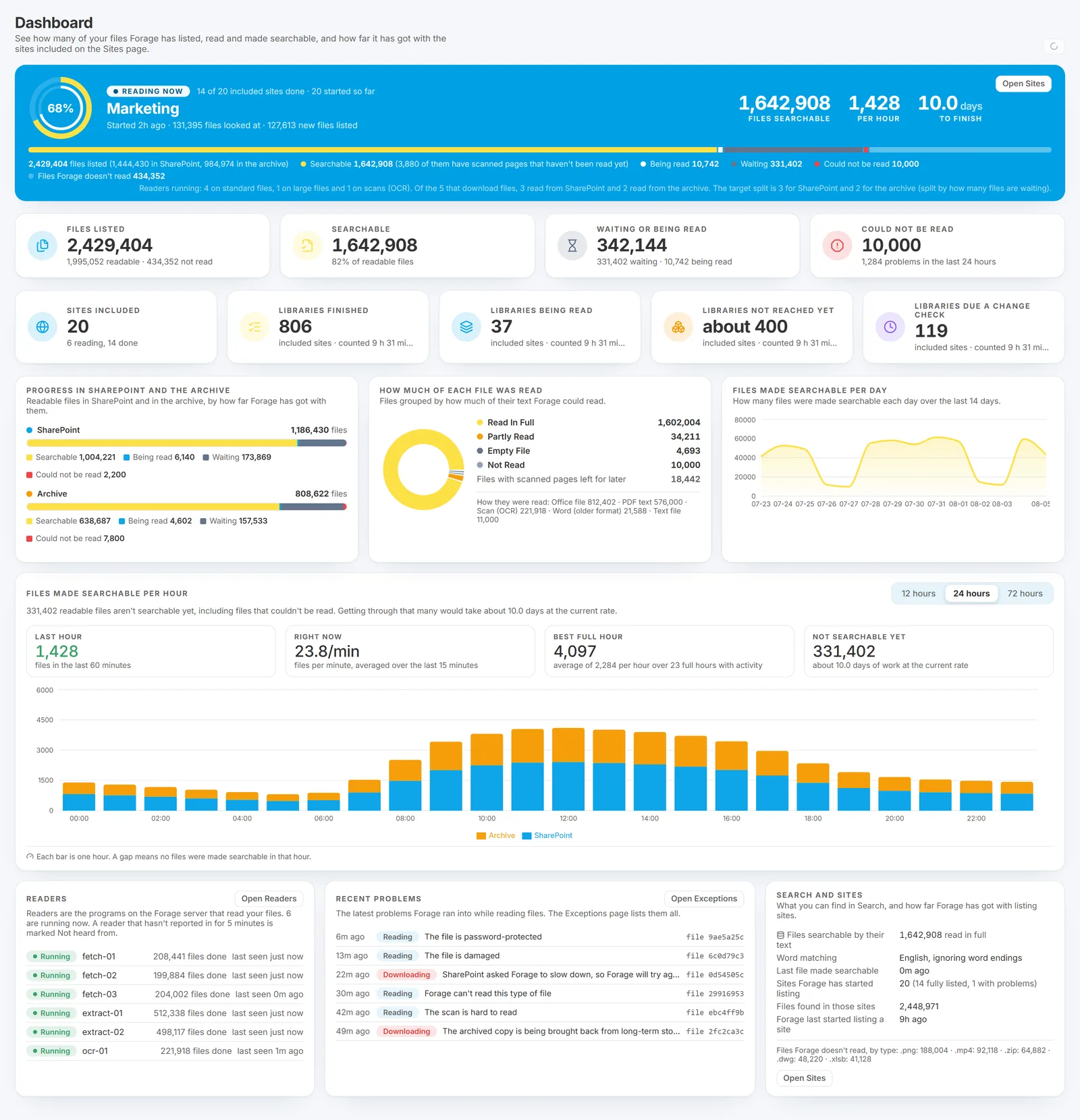
The dashboard answers the first question anyone asks: how much of the estate is searchable, and how long until the rest is.
What you get, in three parts.
Search and coverage. The base. The inventory, the reading, the full-text search across live and archived content, coverage accounting, what could not be read and why, progress reporting, scheduled reports by email, and the audit log.
Labels and rules. An add-on. Content classification: rules that recognise what documents contain, the labels they apply, and search by label. Available as an add-on to the base.
Retention and disposal. In development. Forage is designed to apply a retention schedule, put expired documents in front of a person for a decision, honour legal hold, destroy only what a person approved, and produce a disposal certificate. That half is being built and is not available yet. Forage deletes nothing today.
Features: what it does now.
Reads the documents, not just the file names. PDF; Word, Excel and PowerPoint files, including templates and macro-enabled files; older Office formats; Outlook and standard email messages; and rich text, plain text, CSV, HTML and XML. No Microsoft Office needed on the server. Every cell of an Excel workbook is read, including cells holding only a number or a date.
Scanned documents become searchable. Scanned PDFs and image files are read with optical character recognition, so scanned contracts and forms are findable by their contents. Words in pictures inside Office documents are read too. A page read with low confidence is never left out: its text is kept and marked as a low-confidence reading, so nothing is quietly dropped.
Search that tells you what it could not read. Results carry highlighted extracts, the file's name and full location, when it was modified and its size. A file Forage has listed but not read is still found by its name, and says plainly why it was not read.
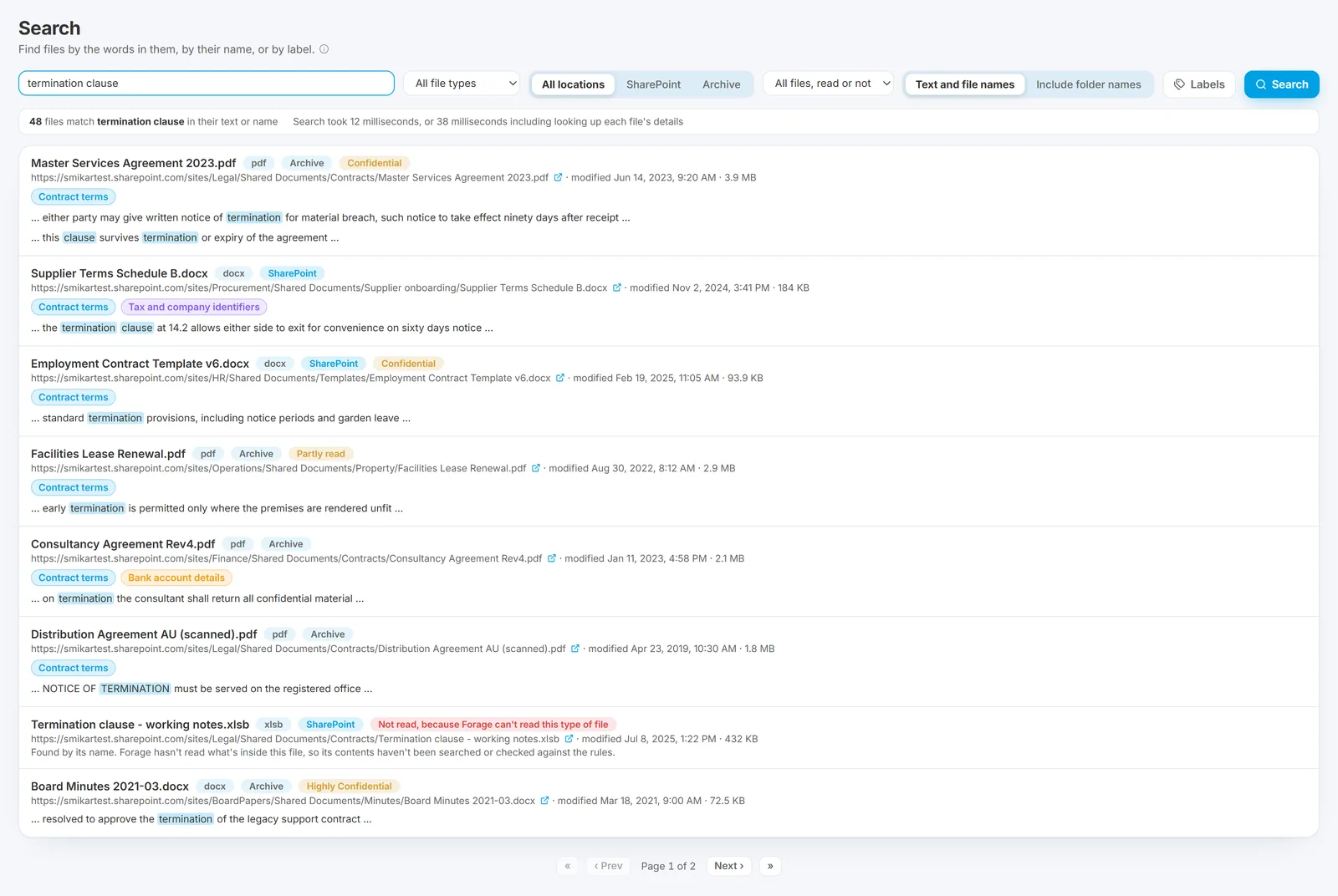
A file that could not be read is still found by its name, and the result says why rather than leaving a silent gap.
Content classification, as an add-on. Forage recognises what documents contain, such as bank details, payment card numbers, tax and company identifiers, passport numbers, health information and contract terms. Administrators write, version and test their own rules, and a test run before a rule goes live shows the most it could match and a sample checked with the real rule.
Rules you can explain to an auditor. Rules use phrases, patterns, checksum checks and words that must appear near each other. Nothing infers or guesses: the same document always gives the same result, and every finding keeps the words that produced it.
Your own labels. Administrators create, edit, retire and reinstate their own content labels, each with a name, a category, a severity and a description. A label in use is retired rather than deleted, so what it found stays listed and explained, and every change is kept in the label's history.
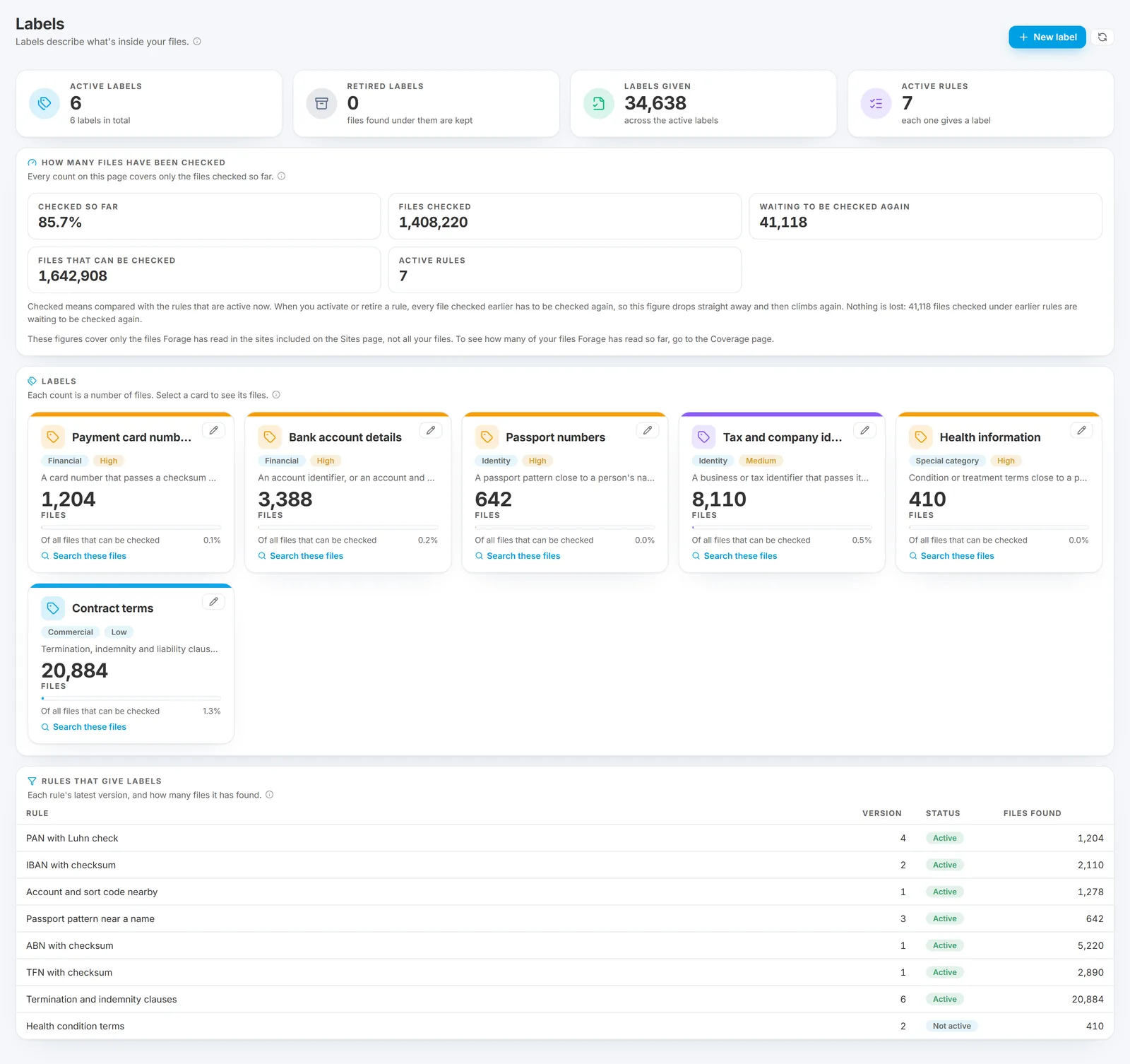
Each label counts files, not findings, so a document with four card numbers in it counts once.
An audit log you can hand over. Settings changes, rule and label changes, site changes, data resets, searches and who made them, documents opened in the portal, reports exported and emailed. No one using Forage, administrators included, can change or remove an entry. It exports to PDF or a spreadsheet.
Reports for a board or an auditor. All your files, sensitive content, labels by file, and files not read with the reason. Each filtered by site and date, exported as a PDF or a spreadsheet, or emailed to the people who need them on a schedule you set.
How Forage works: three moving parts.
Step 1: You choose what's read.
Administrators choose live content, archived content or both, and which document types are read. Every change is recorded with who made it, when and why.
Step 2: Forage reads it.
Archived copies are opened inside your own deployment with your own archive key. For every document it reads, Forage records how it was read, page by page, and keeps a cryptographic fingerprint of the file.
Step 3: It reports what it did.
The dashboard and Coverage page show how much of the estate is searchable, which sites have been read and the rate it is working at. What could not be read is grouped by cause and ranked by how many documents it cost, and says whether the cause lies with the file, the source or Forage.
What Forage does not do.
We would rather you knew this before a trial than after one.
It does not delete anything. The retention and disposal half is in development. Retention rules and clocks, disposition review, legal hold, destruction and disposal certificates are not available yet.
It does not change your source content. Forage only reads SharePoint, the archive and Squirrel's records. It does not change, move or delete any source document, and it writes nothing back to Squirrel.
It does not touch Microsoft's labels. Search results show the retention label and the sensitivity label Squirrel recorded for each file, but Forage never applies, changes or removes one, and does not act on retention labels.
Some formats are not read today, including binary Excel workbooks, compressed folders and design files. They are counted, with the reason, so they appear in reports rather than vanishing.
Exporting search results, including for eDiscovery, is not yet available.
The full list, kept current, is in the Forage limitations documentation.
FAQ: Questions, answered.
Does Forage work on content we have already archived?
Yes, and that is the point of it. Forage reads the content Squirrel has archived, opening the encrypted, compressed archive copies inside your own deployment with your own archive key. Live SharePoint content and archived content appear in one inventory and one search.
Does any of our document content leave our environment?
No. The text Forage reads, and its search index of that text, stay inside your own deployment. Where an administrator switches on emailed reports, the reports themselves go to the addresses chosen, and they carry figures, file names and site names, never the text inside a file.
How does classification decide what a document contains?
Transparent rules that you can read and change: phrases, patterns, checksum checks such as the Luhn check on a card number, and words that must appear within a set distance of each other. Nothing is inferred. The same document always gives the same result, and every finding keeps the words that produced it, so an auditor can see why a file carries a label.
Can it delete expired records for us?
Not yet. Forage deletes nothing today. Retention schedules, disposition review, legal hold, destruction and disposal certificates are in development, and we will not describe them as finished before they are. What Forage does today is find, read, classify and account for content, which is the groundwork all of those depend on.
Will it slow down SharePoint?
Forage takes its inventory from Squirrel's existing records rather than crawling SharePoint again, and reads documents at a rate its administrators control. When SharePoint asks it to slow down, it backs off and returns gradually.
What does it run on?
Forage is operated by SmiKar as part of the Squirrel platform, with its own deployment per customer: its own database, its own search index, and no path for one customer's query to reach another customer's data.
More on Forage.
- Forage documentation
- How Forage works, end to end
- What is built and what is not
- Using the Records section
- Forage limitations
- Forage questions and answers
- Squirrel archiving (the other half of the product)
- Security and detection (Burrow)
Ready when you are.
Talk to the Squirrel team | Read the Forage docs
Or email sales@smikar.com.