The day an employee hands in their notice is the start of the single highest-risk window for data walking out the door. They still have full access to SharePoint, OneDrive, and Teams. They know what is valuable. And they now have a reason to take it - to a competitor, to their own next venture, or simply "to be safe." Most organisations do not find out until months later, when the data surfaces somewhere it should not.
This guide covers what departing-employee data theft looks like in Microsoft 365, why native tools rarely catch it in time, and how to monitor the leaver window without standing up a full security operations centre.

Why the notice period is the danger zone
Insider data theft is not usually a dramatic breach. It is an authorised user doing authorised things at an unusual scale. A finance analyst who normally opens a handful of files a day suddenly downloads an entire SharePoint library. A departing salesperson shares the customer list to a personal address. A contractor on their last week syncs gigabytes to a personal device through OneDrive.
Every one of those actions is technically permitted. Nothing is "hacked." That is exactly why perimeter security, antivirus, and even most data loss prevention rules miss it - the activity is legitimate in isolation and only looks wrong in the context of who is doing it, how much, and when.
The notice period concentrates that risk. The person is motivated, still trusted, and operating inside a window your IT team knows about in advance but usually does nothing to monitor.
What data theft actually looks like in Microsoft 365
The common exfiltration patterns, in plain terms:
- Mass download. Pulling far more files than normal from SharePoint or OneDrive in a short window - often from sites the person rarely touches.
- Exfiltration to cloud storage. Copying content out to personal cloud accounts or synced devices. In MITRE ATT&CK terms this is T1567.002, Exfiltration to Cloud Storage.
- External sharing. Granting access to documents to a personal or external email address, or creating anonymous sharing links. See SharePoint external sharing security for how this channel is abused.
- Permission and label tampering. Removing sensitivity labels, changing permissions, or moving content to less-monitored locations before taking it.
- Quiet collection. Slowly staging content in a personal folder or a single library over the final weeks, below the threshold any fixed rule would catch.
Why Microsoft's native tools miss it
Microsoft 365 records all of this in the unified audit log. The problem is not visibility - it is signal. The audit log is a firehose of millions of events with no notion of what is normal for a given person, no severity, and no alerting worth the name. To catch a leaver mid-theft with native tooling you would need someone watching the right user at the right moment and already knowing what "unusual" looks like for them.
Purview Data Loss Prevention helps with specific, pre-defined content patterns, but it is rule-based and content-focused - it does not model a user's behaviour or flag "this person is acting nothing like themselves this week." Our guide to data loss prevention in SharePoint Online covers where DLP fits and where it leaves gaps.
The result for most enterprises: the evidence exists, but nobody sees it until an auditor, a lawyer, or a competitor forces the question long after the person has gone.
How to actually monitor the leaver window
Catching insider theft is a behavioural problem, not a signature problem. Three capabilities make the difference:
- Behavioural baselines. The system learns what normal looks like for each user - their typical hours, file volume, the sites they touch, their sharing rate - and flags the moment activity drifts. That is what turns "downloaded 400 files" from a meaningless number into "downloaded 50x their normal volume, from sites they haven't opened in months."
- A watchlist for known-risk users. When someone gives notice, you should be able to put that specific person under heightened monitoring for a set period - surfacing activity the system would normally stay quiet about, and delivering a running report of what they touched.
- Evidence you can hand to HR or legal. When the question comes months later, you need to answer "show me every file this user accessed in their last 30 days" in minutes, with an export that stands up in a tribunal.
This is exactly what Burrow, the security and detection layer of the Squirrel platform, is built to do.
How Burrow monitors a departing employee
Burrow watches the Microsoft 365 audit stream - SharePoint Online and Entra ID - and runs it through a deterministic rules engine, a behavioural analytics layer that baselines each user against their own history, and an AI step that writes each alert up in plain English. Every detection carries a severity, a MITRE ATT&CK technique tag, and the underlying evidence.
For the leaver case specifically:
- Put them on the watchlist the same day they resign. Burrow places the user under heightened monitoring for a period you set - the classic notice-period window. Activity it would normally quiet is surfaced and sent to the inbox you nominate, and a daily AI-written report of everything they did lands automatically until the watch expires on its own. Every watch carries a reason, an owner, and an audit trail of who put whom under watch and when.
- Catch the mass-exfiltration patterns as they happen. The rules engine flags the download spikes, the external shares, and the label tampering; the behavioural baseline catches the drift a fixed threshold would miss.
- Get a narrative, not a log. Each alert arrives as a plain-English "why this matters" paragraph with the key numbers, names, timestamps, and MITRE technique called out - verified against the source evidence before it is sent, so it stands up in an audit report.
Because Burrow reads from Microsoft's audit data rather than from SharePoint itself, users feel nothing and SharePoint performance is untouched.
After the fact: answering the investigation in minutes
When HR or legal asks the question weeks later - "show me every file this person accessed in the 30 days before they left" - Hunt, the cross-entity activity search inside Burrow, answers it directly. Type the user, set the date range, optionally narrow to a site or file pattern, and Hunt returns every matching event - downloads, shares, permission changes, access - drawn from the same audit data that powers the alerts. Export it as a CSV for the evidence pack in under a minute. No audit-log export, no Excel pivots, no analyst time.
Doing It Defensibly: The Governance Side of Watching One Person
Singling out a named employee for closer scrutiny than their colleagues is a sensitive act, and the mechanics above are only half the job. Done casually, monitoring creates the exposure it was meant to prevent: a grievance, a data protection complaint, or evidence a tribunal declines to accept because nobody can explain how it was gathered.
The controls that make it defensible are not complicated, but they have to be designed in rather than promised.
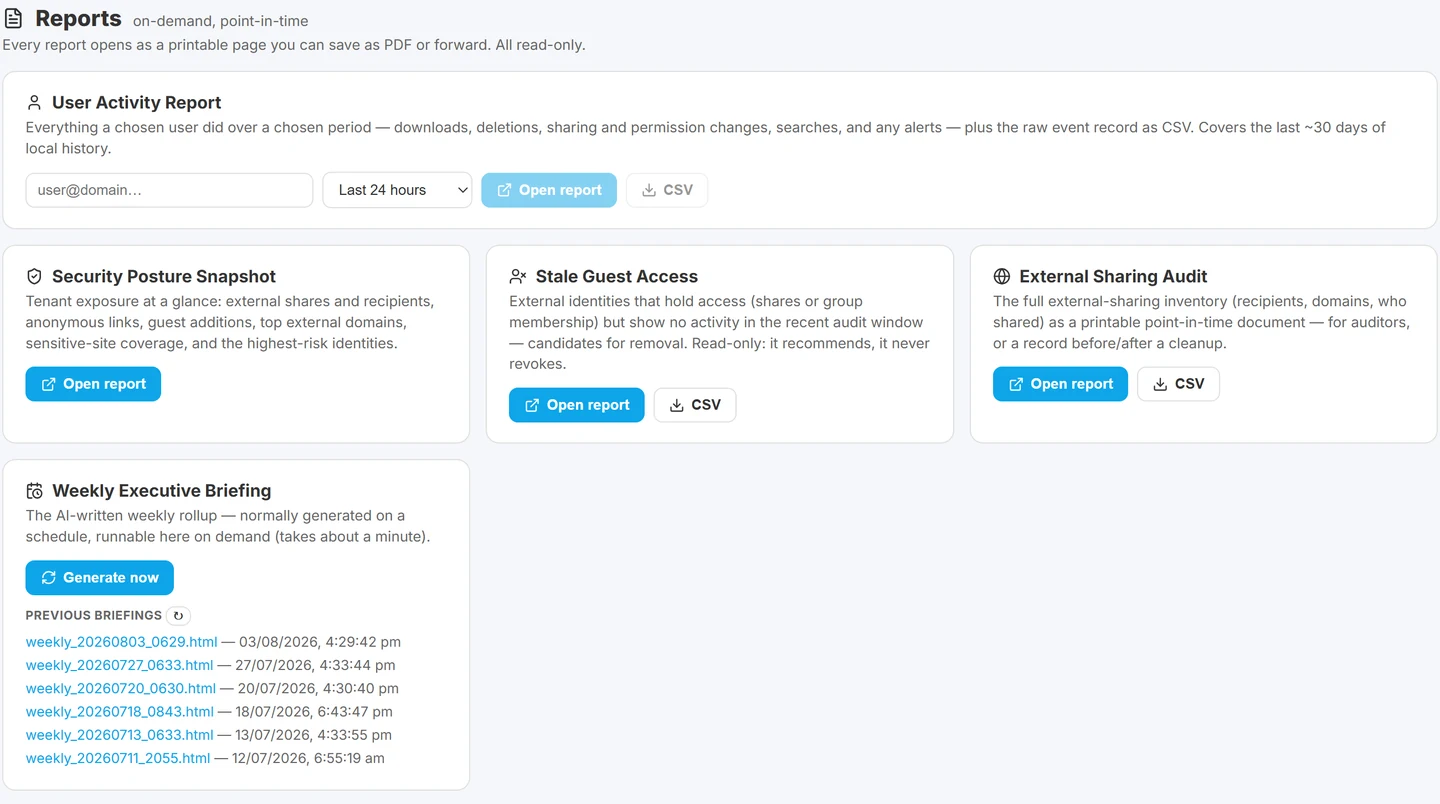
The on-demand reports, including the per-user activity report handed to HR, legal or an auditor.

A stated reason, recorded at the time. "Resignation, last day 29 July" is a reason. Being able to produce that reason months later, unchanged, is what separates a legitimate business measure from someone quietly watching a colleague.
A named owner. Somebody specific decided to do this. If nobody owns the decision, nobody can justify it.
An expiry set at the start, not left open. Elevated monitoring should have an end date chosen when it begins, and it should end by itself. A watch that runs until somebody remembers to remove it is indistinguishable from permanent surveillance, and it will eventually be described that way. Thirty days suits a standard notice period; a long notice or garden leave might need three or four months. What matters is that the number is chosen deliberately and enforced automatically.
An append-only audit trail of the monitoring itself. Every addition and removal recorded, including who did it and when. The monitoring has to be as auditable as the activity it watches, because the first question in any dispute is not "what did the employee do" but "why were you watching them".
Scope that can only be widened, never narrowed. A mechanism that raises attention on an explicit list is defensible. One that can also be used to quiet somebody is a mechanism for concealment, and its existence undermines the integrity of everything the system reports.
Proportionality in what it changes. Heightened monitoring should not mean alerting on everything. Someone under notice still generates hundreds of ordinary events a day, and a firehose helps nobody. The useful change is narrower: signals that would normally be filtered out as routine are surfaced instead, and a daily summary of genuine activity goes to a named recipient.
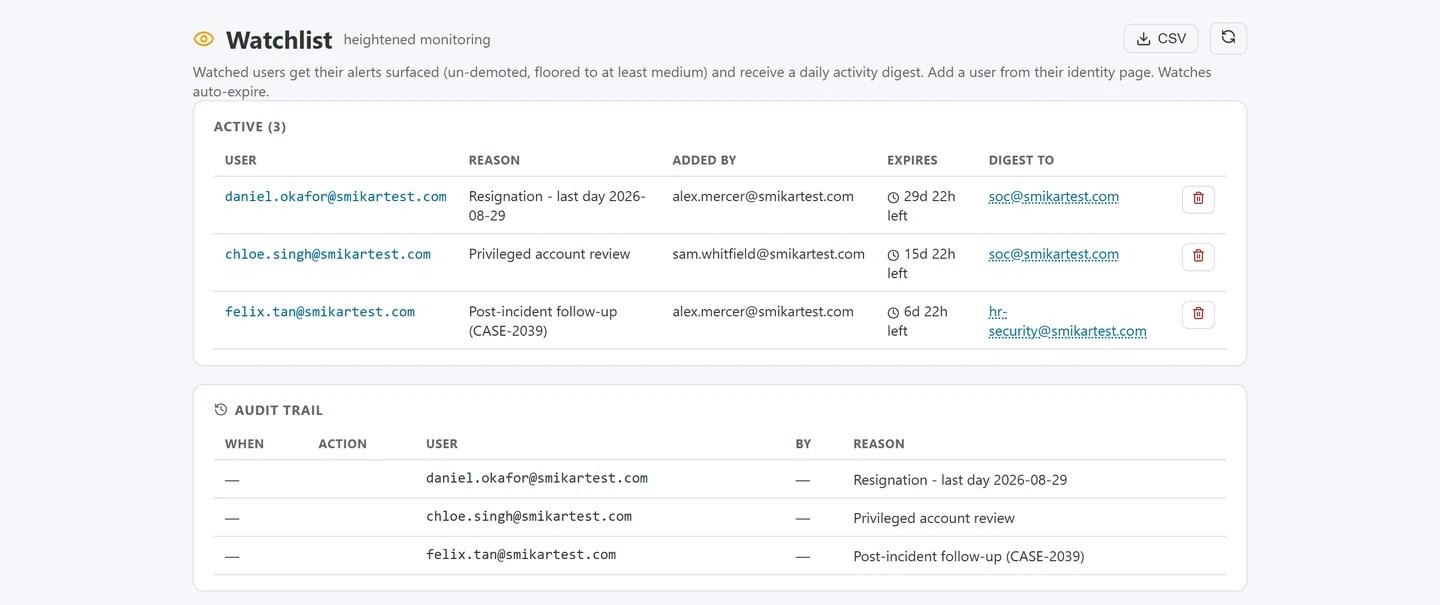
The controls above as they exist in practice: each watch carries its reason, its owner and its expiry, and the list clears itself as watches lapse.
The part that varies by jurisdiction
Employee monitoring law is not uniform. Notification duties, the lawful basis you rely on, whether a works council or employee representative body must be consulted, and how long you may retain what you gather all differ substantially between countries, and sometimes between regions within one country. A global organisation cannot assume one policy travels.
None of that is a reason to avoid monitoring a departing employee, which is a well-established and generally accepted business measure. It is a reason to have the conversation with HR and legal before the first person is added, rather than during the dispute that follows. The technical controls above exist to make that conversation short: you can show precisely who was watched, why, by whom, for how long, and what was collected.
Fit it into your offboarding process
Departing-employee data theft is one half of a complete offboarding posture. The other half is not losing the data you are entitled to keep:
- Preserve the leaver's data before Microsoft deletes it. Microsoft begins deleting a departed user's OneDrive, mailbox, and Teams content within 30 days of the account being deleted. Microsoft 365 departed user archiving with Chipmunk captures it first.
- Reclaim the licence you are still paying for. See stop paying for Microsoft 365 licences after staff leave.
- Keep the archive recoverable. Content archived by Squirrel into your own Azure storage remains restorable - useful if a compromised or malicious account damages files on the way out.
Monitor the leaver window with Burrow, preserve their data with Chipmunk, and archive inactive content with Squirrel. Burrow is the security half of the Squirrel platform; Chipmunk is SmiKar's separate departed-user archiving product.
Your data stays yours
Burrow writes the historical event store and cold-storage audit archives to your own Azure storage account. You retain ownership of the audit history - you can read it, export it, audit it, or migrate it without SmiKar's involvement. Burrow connects to your tenant through a single, read-only Entra ID app consent; there is no software on user devices and no infrastructure for your team to provision.
Frequently asked questions
Is it legal to monitor a departing employee's file activity?
Monitoring workplace systems for data protection purposes is a well-established business measure, but the rules vary by jurisdiction: notification duties, the lawful basis relied on, whether a works council or employee representative body must be consulted, and retention limits all differ by country. The practical answer is to agree the approach with HR and legal before anyone is added to heightened monitoring, and to make sure the mechanism records who was watched, why, by whom and for how long, so the decision can be reviewed rather than defended from memory.
Is monitoring a departing employee legal?
Monitoring of workplace systems for security and compliance purposes is generally permitted where employees have been informed through acceptable-use and privacy policies, but the specifics depend on your jurisdiction and your own policies. Burrow supports this by keeping a full audit trail of every watch - who placed it, on whom, when, and why. Confirm your approach with your own legal and HR teams before relying on it in a dispute.
Will the employee know they are being watched?
Burrow reads Microsoft's audit data in the background. There is no agent on the user's device and no change they can see in SharePoint. Monitoring is invisible to the user by design.
Can we catch theft that already happened?
Yes - if the activity is in the Microsoft 365 audit log, Hunt can search it after the fact. Retention is limited only by how long you keep the audit history in your own Azure storage, which is your policy to set.
How are alerts delivered?
Burrow sends email alerts to the addresses you nominate, each with the AI-narrated context, the MITRE tag, and a link back into the dashboard for the full evidence chain.
Do we need a SIEM or a SOC to use this?
No. Burrow is built for organisations that want to detect malicious or anomalous activity in SharePoint and Entra ID without standing up a full SIEM. If you do have a security function, every alert is MITRE-tagged so it speaks the same language as Defender, Sentinel, and your incident-response runbook.
See Burrow watch a tenant
Burrow is a SaaS addon to the Squirrel platform. If you already run Squirrel, activating it is a subscription change - no new install, no new infrastructure.
Book a Burrow demo | Read the Burrow docs
Or email sales@smikar.com.
A bulk delete on the way out is one of the clearer signals, and one of the easiest to misread: telling a mass deletion from a folder move.
A caution when reviewing a leaver's activity: several ordinary platform behaviours look exactly like exfiltration. See SharePoint audit log noise.
Compromised credentials produce a different early signal to an insider: impossible travel in Microsoft 365.
Insider exfiltration maps to specific ATT&CK techniques: MITRE ATT&CK techniques in the Microsoft 365 audit log.
Mark Smith co-founded SmiKar Software in 2015 and has spent the past decade helping organisations solve Microsoft 365 data management challenges. He works with the SmiKar team to build solutions for SharePoint archiving, storage optimisation, governance and compliance, supporting customers from growing businesses through to Fortune 500 enterprises.
More about SmiKar