
Nutshell
AI Powered Summarisation Engine
Nutshell is an advanced AI-powered document summarisation feature built into Squirrel, SmiKar’s automated SharePoint Online archiving solution. It enhances archived content by embedding clear, human-readable summaries directly into stub files left behind in SharePoint after documents are archived.
This allows users, legal teams, and even Microsoft Copilot to quickly understand what archived documents contain - without needing to fully restore or open the files.
Get More from Your Archived Content
AI-generated document overviews embedded into stub files make it easy to understand what’s inside archived files without restoring them.
Enhanced Search Results
Improve SharePoint and Copilot discovery - summaries appear in search results, helping users quickly identify relevant archived content.
Faster User Decisions
Boost productivity by letting users instantly see if an archived document is relevant, saving time and frustration.
Compliance-Friendly Context
Support records and legal teams with clear, human-readable summaries that simplify audits, reviews, and retention checks.
How Nutshell Enhances Archived Files
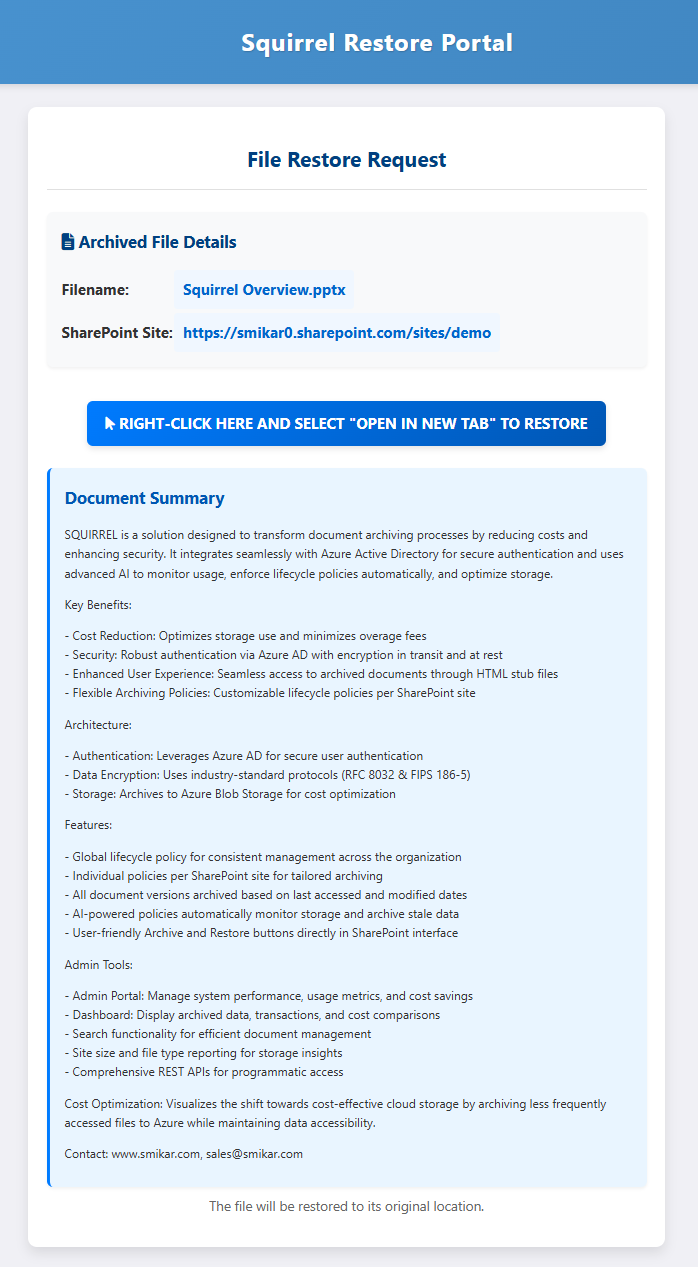
When Squirrel archives a file, it leaves behind a stub file in SharePoint - a placeholder showing the file name, location, and a restore link.
By default, these stubs contain no content information, so users, search, and Copilot cannot tell what the file was about without fully restoring it.
With Nutshell, Squirrel automatically generates a concise AI-powered summary of the document’s contents and embeds it into the stub.
This transforms stubs into searchable, content-rich placeholders.
Standard Stub (Without Nutshell)
Limitations:
- Shows only filename, site, and restore link
- No content description or keywords
- Invisible to SharePoint search and Copilot
- Users must restore files to know what’s inside
Nutshelled Stub (With Summary)
Enhancements:
- Includes all standard stub details
- Embedded AI-generated summary of the original document
- Indexed by SharePoint search and Microsoft Copilot for richer results
- Users, search, and Copilot can all understand the archived content instantly
Why It Matters
- Boosts discoverability - summaries are indexed, so archived files show up in SharePoint searches
- Improves Copilot accuracy - Copilot uses the summaries as context to produce better answers
- Saves time - users don’t need to restore files just to see what they are
- Reduces support load - legal, records, and project teams can review archived content at a glance
Configuring Nutshell AI
Nutshell includes a powerful admin console that lets you control how summaries are generated, which file types are processed, and how sensitive data is protected. This gives you full flexibility to tailor Nutshell to your organisation’s needs.
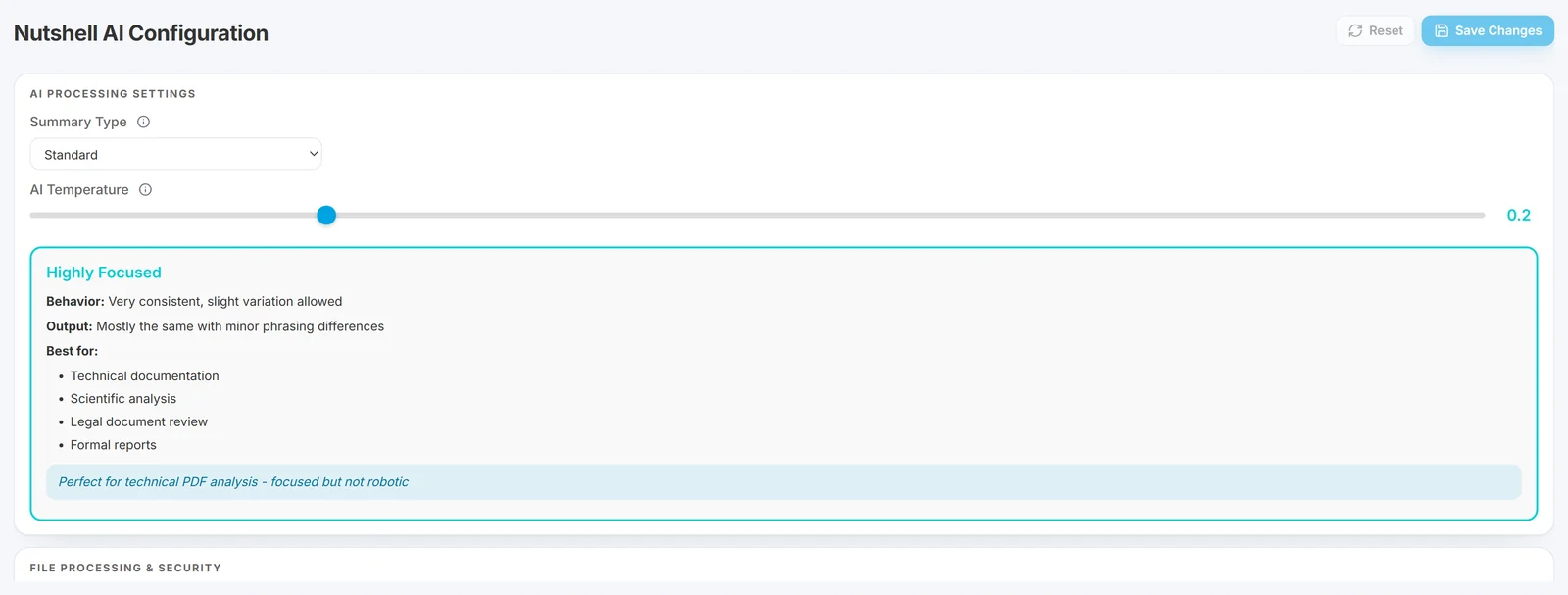
AI Processing Settings
Admins can control:
- Summary Type - Choose from different summary styles (e.g. Standard, Technical, Executive) depending on your audience and use case.
- AI Temperature - Adjust how creative or consistent the summaries are:
- Highly Focused (Low temperature) – Very consistent phrasing, ideal for technical content, legal reviews, and reports.
- Balanced (Medium) – Adds light variation while staying accurate, ideal for general business documents.
- Exploratory (High) – More varied summaries for brainstorming-style content or informal documents.
This ensures you can tune Nutshell from “robotically precise” to “more human and varied,” depending on the type of content you archive.
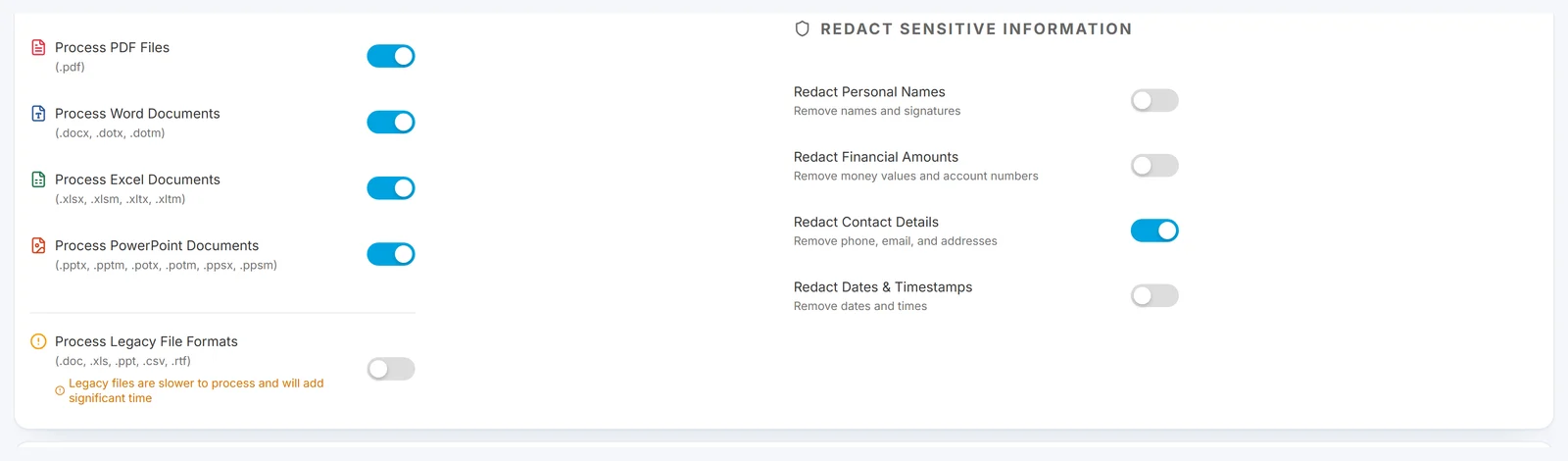
File Processing & Security
Admins can also define which file types Nutshell will summarise and whether to automatically redact sensitive information during processing.
File Types Supported:
- PDF files (.pdf)
- Word documents (.docx, .doc, .dotx, .rtf)
- Excel workbooks (.xlsx, .xls, .csv)
- PowerPoint presentations (.pptx, .ppt)
- Text files (.txt, .text)
Built-in Redaction Controls:
- Personal names and signatures
- Financial amounts and account numbers
- Contact details (emails, phone numbers, addresses)
- Dates and timestamps
These controls help protect confidentiality and compliance requirements when processing large volumes of files.
Why Archived Content Disappears from Microsoft Copilot - and How Nutshell Fixes It
When a document is archived out of SharePoint Online using a standard archiving approach, it is removed from the SharePoint index. Microsoft Copilot queries the SharePoint index to answer questions and surface relevant content. Once a document leaves the index it becomes invisible to Copilot - even if the user knows it exists and needs it. For the full technical explainer covering both archiving failure modes (Microsoft 365 Archive's deliberate Copilot exclusion and standard HSM archiving's index removal), see Microsoft Copilot and archived SharePoint content: the visibility gap.
Microsoft's own archive tier reaches the same outcome by design. The Microsoft 365 Archive FAQ answers the question in one line: "No, archived content isn't used by Microsoft Copilot." Microsoft 365 Archive removes archived content from Copilot deliberately, so a site or file archived that way cannot be cited in a Copilot answer until someone reactivates it. Nutshell takes the opposite position: the summary stays in the SharePoint index, so Copilot can still find and cite the document while the full file sits in your own Azure storage. If you are clearing out stale content ahead of a Copilot rollout, preparing SharePoint for Microsoft 365 Copilot sets out what to archive first and how to keep it findable afterwards.
For organisations deploying Microsoft Copilot for Microsoft 365, this creates a significant problem. The value of Copilot depends on it having access to your organisation’s knowledge base. If years of archived project files, contracts, reports, and communications are invisible to Copilot, the tool is working with an incomplete picture of your organisation’s knowledge.
Nutshell AI solves this by embedding a human-readable summary of each archived document directly into the stub file that remains in SharePoint. The stub file - and its Nutshell summary - stays in the SharePoint index. Microsoft Copilot can read the summary, understand what the archived document contains, and surface it in relevant responses without the document needing to be restored.
The result is a Copilot that has access to your entire knowledge base - not just the fraction that happens to be in active SharePoint storage.
How Nutshell AI Works
Step 1 - Squirrel archives the document
When a document meets your lifecycle policy criteria, Squirrel moves it from SharePoint Online to Azure Blob Storage. A stub file is placed in the original SharePoint location retaining the file name and location.
Step 2 - Nutshell AI analyses the archived document
Once the document is archived and the stub is in place, Nutshell AI reads the archived document from Azure Blob Storage and generates a clear, concise plain-language summary of what the document contains. The summary captures the key topics, entities, and context needed for search and Copilot to understand the document’s relevance.
Step 3 - The summary is embedded into the stub file
The Nutshell AI summary is written back into the stub file sitting in SharePoint. The stub file now contains both the restore link and a human-readable summary of the archived document’s contents.
Step 4 - Copilot and SharePoint Search can discover the archived document
Microsoft Copilot and SharePoint Search index the updated stub file including its Nutshell summary. When a user asks Copilot a question relevant to the archived document, Copilot can surface it in its response. When a user searches SharePoint, the archived document appears in results with a summary of its contents - helping users decide whether to restore it before they do so.
What Copilot can and cannot answer from a Nutshell summary
A Nutshell summary is 200 to 500 words of plain-language prose describing what the document is about, how it is structured, its key points and, where the document has them, its conclusions or recommendations. Brief, Standard and Detailed modes control the length. That summary is what Copilot and SharePoint Search index, so it is worth being exact about what it can and cannot do.
What Copilot can do with an archived document once it is summarised
- Find it. A question about the topic, project, customer or product the document covers returns the stub, in the same results as live documents.
- Say what it is. Copilot can describe the document's purpose, scope, structure and main conclusions from the summary, and cite the stub as its source.
- Point the user to it. The answer links to the stub, and the stub carries the restore link, so a user who needs the full document is one click from it.
- Help the user decide. Most archived-content searches end in "is this the document I need?" The summary answers that without a restore.
What it cannot do until the document is restored
- Quote a specific figure, clause or table. A summary of a 200-page contract says what the contract covers and how it is structured; it does not contain the indemnity cap on page 47, and Copilot cannot answer that question from the stub.
- Answer from text the summary did not carry. Anything in the document that the summary does not mention is not in the index.
- Open the document. The full content is in your Azure storage, not in SharePoint, until someone restores it.
That boundary is deliberate. The purpose of archiving is to take content out of SharePoint storage; Nutshell keeps enough in the index for the content to be found and judged, not the whole document. If the complete text of a set of documents must stay in the index, those documents should not be archived, and Squirrel's lifecycle rules can exclude them by library, path, file type or sensitivity label.
The restore path when the summary is not enough
When a user or Copilot lands on a summary that does not answer the question, the way back is the standard Squirrel restore.
- The user opens the stub, which shows the summary and a restore link, and clicks it.
- Squirrel retrieves the original from your Azure Blob Storage and puts it back in its original library and folder, with its version history and metadata. Most restores complete immediately; large files can take a few minutes. There is no restore fee from Squirrel and no rehydration wait on the default Azure tiers.
- SharePoint Search indexes the restored document in full, and Copilot can answer detailed questions from it as it would from any live file.
- If the document goes unused again, the lifecycle rules archive it again when it meets your thresholds, and Nutshell summarises it again.
If the stub was deleted before anyone restored it, the archive is untouched: the file appears in Squirrel's orphaned-files view and an administrator can restore it, and the summary is also kept as a companion copy alongside the archived file in your storage. Nutshell can be switched on after the fact as well: documents archived before it was enabled can be queued for bulk summarisation, so an existing archive becomes discoverable without restoring anything.
Frequently Asked Questions About Nutshell AI
Q: What is Nutshell AI?
A: Nutshell AI is an AI-powered document summarisation feature built into Squirrel. When a document is archived, Nutshell generates a plain-language summary of its contents and embeds it into the stub file left in SharePoint. This allows Microsoft Copilot and SharePoint Search to understand what the archived document contains without it needing to be restored.
Q: Does Nutshell AI work with Microsoft Copilot for Microsoft 365?
A: Yes. Nutshell AI summaries are embedded into stub files that remain in the SharePoint index. Microsoft Copilot reads the SharePoint index and can surface archived documents in its responses based on their Nutshell summaries - without the documents needing to be restored first.
Q: Why do archived documents disappear from Microsoft Copilot without Nutshell?
A: Microsoft Copilot queries the SharePoint index. When a document is archived without a stub file containing searchable content, it is removed from the index and becomes invisible to Copilot. Nutshell AI solves this by keeping an AI-generated summary of the document in the index via the stub file.
Q: Does Nutshell AI work with SharePoint Search?
A: Yes. SharePoint Search indexes stub files including their Nutshell summaries. Archived documents appear in search results with a summary of their contents, helping users identify whether a document is relevant before deciding to restore it.
Q: Is Nutshell AI included with Squirrel?
A: Yes. Nutshell AI is a built-in feature of Squirrel. It does not require a separate purchase or additional configuration beyond enabling it in the Squirrel dashboard.
Q: What kind of summaries does Nutshell AI generate?
A: Nutshell generates clear, concise plain-language summaries that capture the key topics, entities, and context of each archived document. Summaries are designed to be readable by both users and AI systems including Microsoft Copilot, providing enough context to identify a document’s relevance without needing to open or restore it. Q: Can Copilot answer a detailed question from an archived document?
A: Not from the summary alone. Copilot can identify the document, describe its purpose and main points and link to it, but a specific figure, clause or table that the summary does not mention is not in the index until the document is restored. Once restored, the full document is indexed and Copilot answers from it as normal.
Q: What happens when a user restores a document that has a Nutshell summary?
A: The normal Squirrel restore runs: the original file returns to its original location with its version history and metadata, with no restore fee from Squirrel, and SharePoint Search indexes the full document. If the document is archived again later, it is summarised again.
What changes for users once summaries are in the stubs
Most archiving tools save you storage costs but strip away usability - files become invisible to search, Copilot, and your users. Nutshell changes that. Powered by SmiKar’s own proprietary AI engine, Nutshell transforms archived files into content-aware knowledge assets by embedding clear, concise summaries directly into their stubs.
These summaries are indexed by SharePoint search and Microsoft Copilot, ensuring your historical data remains fully discoverable, useful, and actionable even after it leaves costly SharePoint storage. The result: lower costs, faster discovery, and higher productivity across your entire organisation.
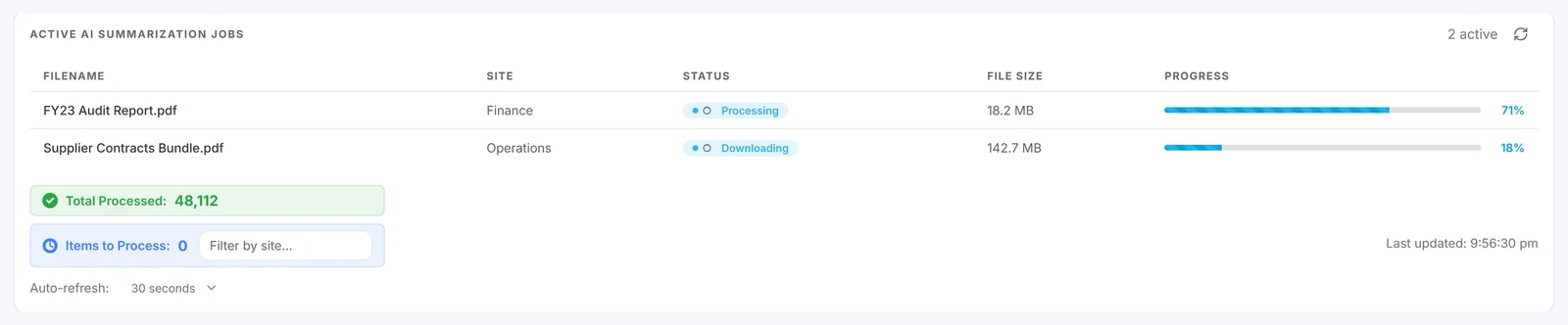
Archived content stays discoverable
With Nutshell AI, archived content stays discoverable and valuable, delivering insights long after it leaves SharePoint storage.
Searchable and usable after archiving
Nutshell keeps archived files searchable and usable by embedding AI summaries that SharePoint search and Copilot can understand.
See Nutshell in a Real Customer Deployment
A FTSE 250 global engineering group deployed Squirrel with the Nutshell AI module specifically to keep their archived engineering content - drawings, specifications, project documentation - discoverable in Microsoft Copilot, while reducing their SharePoint tenant from 460 terabytes to 165 terabytes for a projected $708,000 per year saving. Read the customer case study compilation for the full deployment detail alongside two other documented Squirrel outcomes at Fortune 500 healthcare and mid-market financial services scale.