SharePoint Online Archiving: The Complete Guide for Enterprise IT

SharePoint Online Archiving: The Complete Guide for Enterprise IT

SharePoint Online Archiving: The Complete Guide for Enterprise IT

If your SharePoint Online storage costs are climbing, your document libraries are slowing down, or your compliance team is asking hard questions about where your data is — you need a SharePoint archiving strategy.

This guide covers everything IT leaders and administrators at large enterprises need to know about SharePoint archiving in 2026: what it is, how it works, what Microsoft’s own tools can and cannot do, what to look for in a third-party solution, and how to make a decision that holds up under compliance scrutiny.
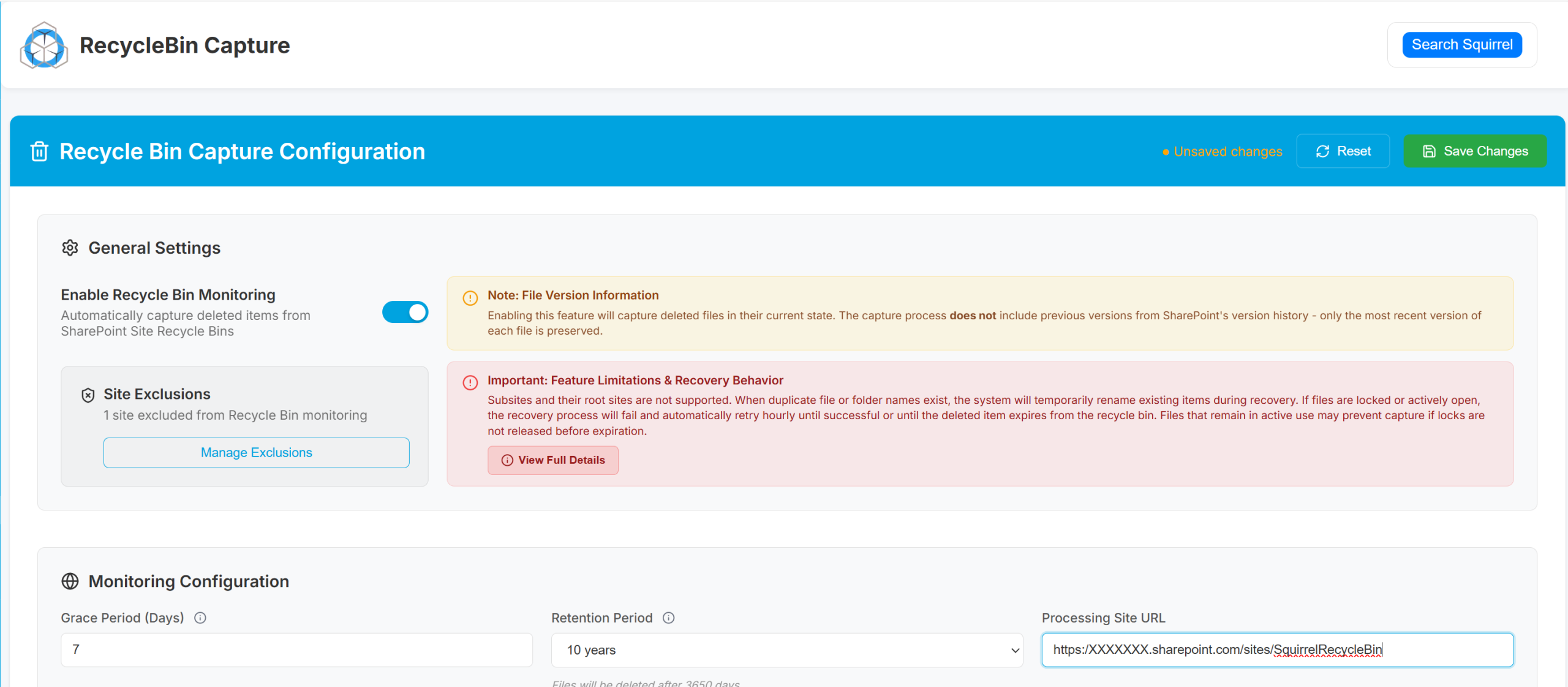
Squirrel Recycle Bin Capture

What is SharePoint Archiving?

SharePoint archiving is the process of moving inactive documents, files, and sites out of SharePoint Online into lower cost storage while keeping them accessible to users and compliant with your organisation’s retention policies.

The key distinction from simply deleting files is that archived content is preserved rather than removed. Users can still find archived documents through SharePoint Search and restore them on demand. IT teams gain the storage reduction and cost savings. Compliance teams retain the audit trails and retention controls they need.

In practice, most SharePoint archiving solutions work by moving content to Azure Blob Storage, which costs significantly less per GB than SharePoint Online primary storage. A lightweight placeholder called a stub file stays in the original SharePoint location, retaining the document name and metadata so end users experience no disruption.

Why Large Enterprises Need a SharePoint Archiving Strategy

SharePoint Online includes a base storage allocation with your Microsoft 365 subscription, but for large enterprises this runs out quickly. Microsoft charges for additional storage at a rate that is substantially higher than equivalent Azure Blob Storage costs. As organisations accumulate years of documents, project files, and team site content, the majority becomes inactive but continues consuming expensive primary storage at the same rate as your most accessed files.

Research consistently shows that around 68% of enterprise data is never accessed after it is created. In a large SharePoint environment, this means the vast majority of your storage costs are being spent on data nobody is using.

The storage cost problem

Microsoft 365 tenants receive 1 TB of SharePoint storage plus 10 GB per licensed user. For an organisation with 1,000 users that is 11 TB of included storage, which sounds substantial until you account for document versioning, the Preservation Hold Library, Teams file storage, and years of accumulated content that nobody has reviewed or deleted.

Once you exceed your included allocation, Microsoft charges for additional SharePoint storage. The cost per GB is significantly higher than Azure Blob Storage Cool tier, which is where most SharePoint archiving solutions move your inactive data. For organisations managing several terabytes of inactive content, the monthly saving from archiving is substantial and compounds over time.

The performance problem

SharePoint Online performance degrades as document libraries grow. Large libraries with tens of thousands of files experience slower search, longer page load times, and higher indexing overhead. Microsoft itself recommends keeping individual document libraries under 300,000 items for optimal performance. Many enterprise environments significantly exceed this threshold.

Archiving inactive documents out of primary SharePoint storage directly improves performance for active users. Smaller libraries index faster, search returns more relevant results, and the platform feels faster overall.

The compliance problem

Many industries require organisations to retain documents for defined periods under regulations including GDPR, HIPAA, FCA rules, and sector-specific standards. Keeping all of that data in expensive SharePoint Online primary storage for seven years or more is not financially viable. But deleting it early is a compliance risk.
A well-implemented SharePoint archiving solution provides a third option: move the data to lower cost storage while preserving all metadata, permissions, and audit trails. The data remains legally accessible and discoverable through eDiscovery tools, but it no longer occupies expensive primary storage.

The Preservation Hold Library problem

One of the most common causes of unexpected SharePoint storage growth is the Preservation Hold Library. When retention policies are applied in Microsoft Purview, SharePoint quietly copies modified and deleted documents into this hidden library to preserve them for compliance purposes. For organisations with active retention policies, the Preservation Hold Library can grow to several times the size of the visible document library without IT teams realising it.

A SharePoint archiving solution that monitors and manages the Preservation Hold Library prevents this hidden storage sink from causing storage overages and unexpected costs.


How SharePoint Archiving Works

While the specific implementation varies between solutions, most SharePoint archiving tools follow the same core process.

1. Identify inactive content using lifecycle policies

The archiving solution scans your SharePoint environment and identifies content that meets your archiving criteria. This is typically based on last modified date, last accessed date, file type, document library, or SharePoint site. More advanced solutions use AI to analyse usage patterns and recommend thresholds based on your specific environment rather than requiring you to guess.

2. Move content to lower cost storage

Documents that meet the archiving criteria are moved from SharePoint Online to the target storage location, typically Azure Blob Storage Cool or Archive tier. The best solutions store archived data within your own Azure tenancy rather than a vendor-hosted environment, ensuring you retain full ownership and control of your data and that data residency requirements are met.

3. Leave a stub file in SharePoint

Rather than removing the document from SharePoint entirely, the archiving solution leaves a stub file in the original location. The stub retains the original file name, metadata, and folder path. Users searching SharePoint will still find the document. When they need the full file, a single click triggers the restore process and the document rehydrates from archive storage back into SharePoint, typically within seconds.
This stub file approach is what distinguishes purpose-built SharePoint archiving solutions from simply moving files manually to Azure Blob Storage. Without the stub, users have no way to find or restore archived content through the normal SharePoint interface.

4. Maintain audit trails and compliance controls

Every archiving and restore action is logged with full detail including document name, location, user, timestamp, and action taken. Archived documents retain all original metadata, permissions, and classification labels. This ensures the archived data remains legally discoverable and accessible to compliance and legal teams while no longer consuming primary storage costs.

Microsoft’s Native SharePoint Archiving Tools: What They Can and Cannot Do

Before evaluating third-party SharePoint archiving solutions, it is worth understanding what Microsoft’s own tools offer and where their limitations lie. There are two primary Microsoft options to consider.

Microsoft Purview retention policies

Microsoft Purview allows organisations to apply retention policies to SharePoint content, ensuring documents are kept for defined periods and then either deleted or moved to a review stage. These policies are well suited for compliance and legal hold requirements.

However, Purview retention policies do not reduce your SharePoint storage costs. Content subject to a retention policy stays in SharePoint Online primary storage, consuming the same quota at the same cost. The Preservation Hold Library, which Purview uses to preserve copies of modified or deleted documents, actually increases your storage consumption rather than reducing it. Purview solves a compliance problem, not a storage cost problem.

Microsoft 365 Archive

Microsoft 365 Archive is a newer service that does move SharePoint content to lower cost storage. It operates at the site level, archiving entire SharePoint sites rather than individual documents or libraries. As of early 2026, file-level granular archiving is in preview and not yet generally available.

The key limitation of Microsoft 365 Archive for most organisations is the user experience. When a SharePoint site is archived using Microsoft 365 Archive, it becomes completely inaccessible to end users. It disappears from SharePoint navigation, links to it stop working, and it is excluded from SharePoint Search entirely. Only administrators can access or restore it. There is no stub file approach and no self-service restore for users.

This makes Microsoft 365 Archive well suited for truly retired content that nobody needs to access. It is not appropriate for inactive content that users may still occasionally need to retrieve, which describes the majority of enterprise archiving requirements.

Purpose-built third-party solutions like Squirrel fill this gap by providing document-level archiving with stub files, self-service user restore, and full search discoverability, while still delivering the storage cost reduction that Microsoft 365 Archive offers.

What to Look for in a SharePoint Archiving Solution

Not all SharePoint archiving solutions are built the same. For large enterprises evaluating options, these are the criteria that matter most.

Document-level archiving with stub files

Avoid solutions that only archive at the site level. Enterprise environments contain a mix of active and inactive content within the same sites and libraries. You need a solution that can identify and archive individual documents based on usage data, leaving active content in place and keeping the user experience intact through stub files.

Data stays in your own tenancy

The archived data should be stored in your own Azure Blob Storage account within your own Microsoft Azure tenancy. Solutions that store your data in a vendor-hosted environment introduce unnecessary data governance risk, complicate data residency compliance, and create a dependency on a third party for access to your own documents. Your data should never leave your control.

Self-service restore for end users

If restoring an archived document requires an IT ticket, your helpdesk will become overwhelmed and users will quickly lose trust in the system. The restore process must be self-service, available directly within the SharePoint interface, and fast enough that users do not notice any meaningful delay.

Search discoverability after archiving

Archived documents must remain findable through SharePoint Search. If users cannot search for archived content, they will not know it exists and will create duplicate documents or assume the original has been deleted. The best solutions enhance archived content discoverability by embedding AI-generated summaries into stub files, ensuring search results remain meaningful even for content that has been archived.

Compliance and audit trail retention

All metadata, permissions, and classification labels must be preserved through the archiving process. The solution must maintain a complete audit trail of every archiving and restore action to support compliance audits, legal holds, and eDiscovery requests. Confirm compatibility with Microsoft Purview before deploying any archiving solution in a regulated environment.

Automated policy enforcement

Manual archiving is not a strategy. The solution must support automated lifecycle policies that run continuously in the background, identifying and archiving content that meets your defined criteria without requiring ongoing administrative effort. The best solutions use AI to refine these policies over time based on actual usage patterns rather than requiring you to set static date thresholds.

Transparent pricing

Some archiving solutions charge per restore, which creates a perverse incentive against users accessing their own archived content. Look for solutions with predictable pricing based on archived data volume, with no charge for restores. This ensures the cost of running the archiving solution is entirely predictable and does not increase as usage grows.

SharePoint Archiving and Regulatory Compliance

For organisations in regulated industries, SharePoint archiving is not just a cost reduction exercise. It is part of the data governance framework that keeps the organisation compliant with legal and regulatory obligations.

The key compliance requirements to address when implementing a SharePoint archiving strategy are retention period enforcement, data residency, audit trail integrity, and eDiscovery compatibility.

Retention period enforcement

Documents must be retained for defined periods under GDPR, HIPAA, FCA regulations, and other industry-specific standards. A SharePoint archiving solution can enforce these retention periods automatically, ensuring documents are preserved for the required duration and flagged for review or deletion when the period expires. This reduces the risk of documents being deleted prematurely or retained unnecessarily.

Data residency

Many organisations operate under data residency requirements that dictate which geographic region data can be stored in. A SharePoint archiving solution that stores data in your own Azure tenancy in your chosen region satisfies these requirements by design. Confirm that your chosen solution deploys in the same region as your Microsoft 365 tenancy and does not transfer data across regions without your explicit configuration.

eDiscovery and legal hold compatibility

If a document is subject to a legal hold in Microsoft Purview, your archiving solution must respect that hold and not archive or delete the document until the hold is lifted. Confirm that your chosen solution integrates correctly with Microsoft Purview eDiscovery before deployment, and test the legal hold behaviour in a non-production environment before going live.

Frequently Asked Questions About SharePoint Archiving

What is the difference between SharePoint archiving and SharePoint backup?

SharePoint backup creates a point-in-time copy of your environment for disaster recovery purposes. SharePoint archiving moves inactive content to lower cost storage to manage the data lifecycle and reduce ongoing costs. Backup is about restoring your environment after data loss. Archiving is about managing content you no longer need in primary storage but must retain. Most enterprises need both.

Does Microsoft 365 include SharePoint archiving?

Microsoft 365 includes retention policies through Microsoft Purview, which enforce compliance holds but do not reduce storage costs. Microsoft 365 Archive is a separate paid service that archives entire SharePoint sites to lower cost storage, but archived sites become inaccessible to end users and are removed from search. For document-level archiving with user-accessible stub files and self-service restore, a purpose-built third-party solution is required.

How much does SharePoint archiving reduce storage costs?

Organisations using purpose-built SharePoint archiving solutions typically reduce their SharePoint Online storage consumption by 60 to 85%. The exact saving depends on how much inactive content exists in the environment and which Azure Blob Storage tier archived content is moved to. Azure Blob Cool tier costs a fraction of SharePoint Online overage pricing per GB, and Archive tier costs even less for content that is rarely accessed.

Will users be able to find and access archived documents?

With a properly implemented SharePoint archiving solution, yes. When a document is archived, a stub file remains in the original SharePoint location retaining the file name and metadata. Users searching SharePoint will still find the document in results. Clicking on the stub file triggers the restore process and the document rehydrates from archive storage, typically within seconds. No IT involvement is required.

Is SharePoint archiving safe for compliance purposes?

Yes, provided the solution is implemented correctly. Archived documents must retain all metadata, permissions, and audit trails. The archiving solution must be compatible with Microsoft Purview retention policies and legal holds. Data should be stored in your own Azure tenancy to satisfy data residency requirements. A well-implemented archiving solution strengthens rather than weakens your compliance posture by enforcing retention policies automatically and reducing the risk of premature deletion.

What is a stub file in SharePoint archiving?

A stub file is a small placeholder that remains in SharePoint after a document has been archived. It retains the original document name, location, and metadata so the document still appears in search results and folder structures. When a user clicks the stub file, the archiving solution retrieves the full document from archive storage and restores it to SharePoint. The stub file approach ensures archiving is invisible to end users and requires no change to how people work.

How long does it take to implement a SharePoint archiving solution?

Implementation time varies by solution and environment complexity. SaaS-based solutions that deploy within your existing Microsoft 365 and Azure tenancy typically take one to two days to configure and go live. There is no on-premises infrastructure to install. The main configuration time is spent defining your lifecycle policies and deciding which SharePoint sites and libraries to include in the initial archiving scope.

Squirrel: Purpose-Built SharePoint Archiving for Large Enterprises

Squirrel is SmiKar’s enterprise SharePoint archiving platform. It automatically identifies inactive SharePoint documents and moves them to your own Azure Blob Storage account based on your lifecycle policies, leaving stub files in SharePoint so users experience no disruption.

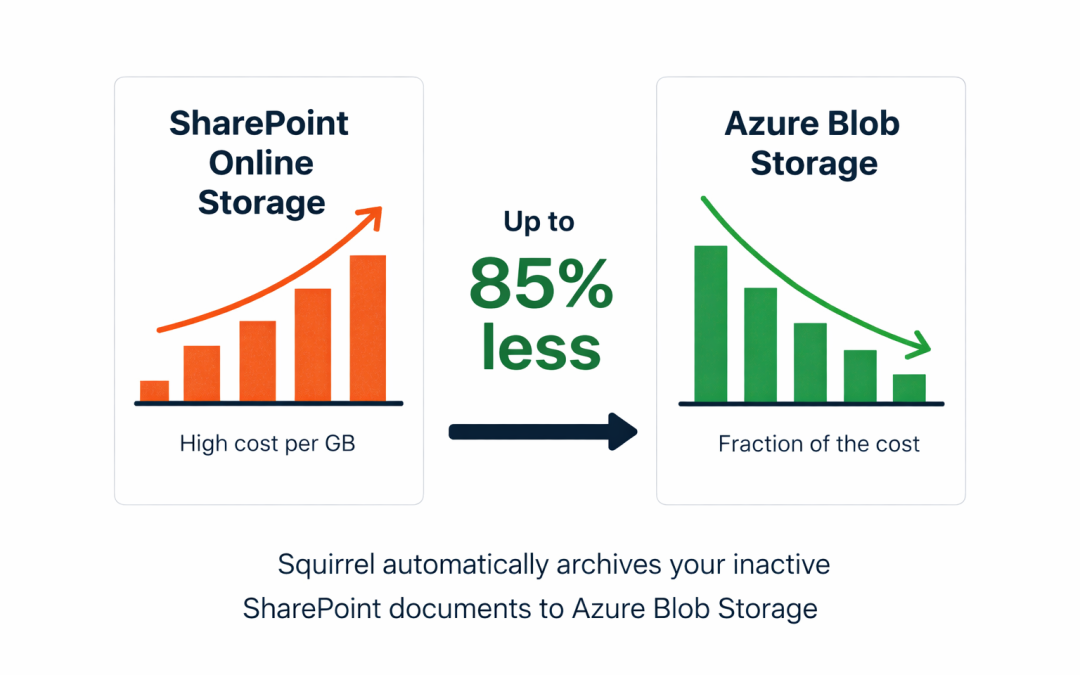
Enterprises using Squirrel typically reduce their SharePoint Online storage costs by up to 85%. Archived documents remain fully searchable through SharePoint Search and Microsoft Copilot via Nutshell AI stub summaries. Users can restore any archived document with a single click, with no IT ticket required.

Squirrel deploys entirely within your own Microsoft 365 and Azure tenancy. Your data never passes through SmiKar infrastructure. All metadata, permissions, and audit trails are preserved through the archiving process, and Squirrel is compatible with Microsoft Purview eDiscovery and legal hold requirements

  • Up to 85% reduction in SharePoint Online storage costs
  • Document-level archiving with stub files and self-service restore
  • Data stored in your own Azure tenancy with no third-party access
  • AI-powered lifecycle policies and Nutshell AI stub summaries
  • Compatible with Microsoft Purview, eDiscovery, and legal hold
  • Typically live within one day with no on-premises infrastructure

Stop Overpaying for SharePoint Storage

Most enterprises are spending significantly more than they need to on SharePoint Online storage. Squirrel automatically moves your inactive documents to Azure Blob Storage, cutting your storage bill by up to 85% without disrupting a single user. Request a demo and we will show you exactly how much your organisation could save.
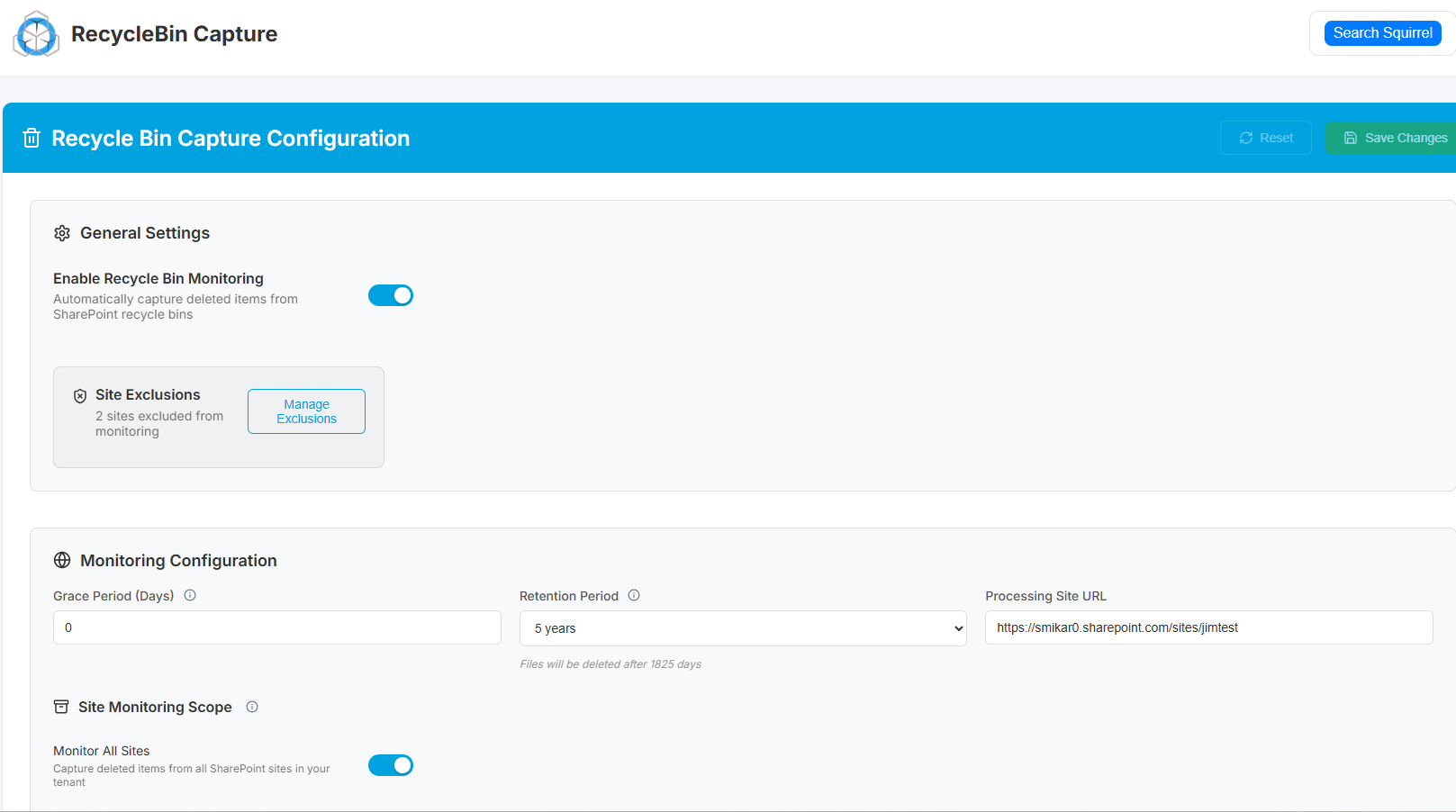

Squirrel Recycle Bin Capture

Ready to start saving on SharePoint costs?

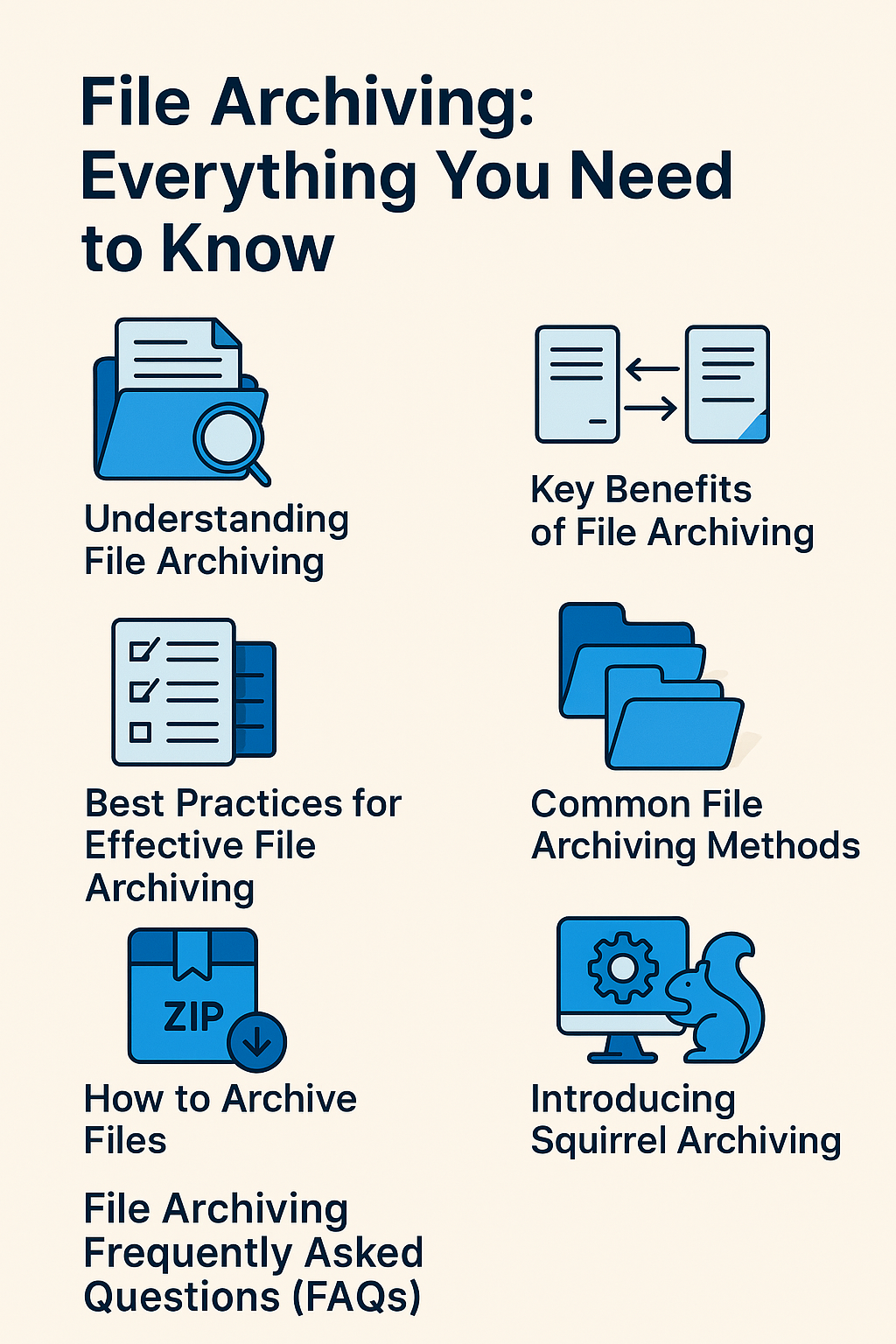
File Archiving: Everything You Need to Know

File Archiving: Everything You Need to Know

What is File Archiving?

In the ever-growing digital landscape, managing vast amounts of data has become a crucial task for organizations and individuals alike. One essential strategy for effective data management is file archiving. But what exactly does this process entail, and why is it important?

File Archiving Key Takeaways

Topic Key Points
What is File Archiving? A method to store infrequently used data securely for long-term retention.
Benefits of File Archiving Storage optimization, cost savings, compliance, data security, and disaster recovery.
File Archiving vs. Backup Archiving is for long-term retention; backup is for short-term data protection and quick recovery.
Common Archiving Methods On-premises, cloud-based, and hybrid solutions.
Best Practices Clear retention policies, metadata use, process automation, and regular data review.
How to Archive Files Identify, organize, compress, select a method, secure storage, and document the process.
Choosing an Archiving Solution Look for configurability, scalability, security, user-friendliness, and strong support.
Squirrel Archiving Features SharePoint integration, stub files, geo-specific nodes, security, and automated rules.
File Archiving

Understanding File Archiving

In today’s digital age, organizations generate vast amounts of data daily. Managing this data efficiently is crucial for operational success and compliance. File archiving plays a pivotal role in this process by moving inactive data to separate storage systems for long-term retention, thereby optimizing storage and enhancing system performance.

File archiving is the process of moving data that is no longer actively used to a separate storage system for long-term retention. This data is often compressed and stored in a more cost-effective medium, freeing up space on primary storage systems and improving overall system performance. Archiving helps organizations maintain data compliance, reduce storage costs, and simplify data management.


Key Benefits of File Archiving

Implementing a robust file archiving strategy offers numerous advantages. From optimizing storage and reducing costs to ensuring regulatory compliance and enhancing data security, archiving helps organizations manage their data more effectively and prepare for potential disasters.

  • Storage Optimization: By relocating infrequently accessed files, primary storage remains uncluttered, improving system efficiency and speed.
  • Cost Savings: Archiving reduces the need for expensive, high-performance storage, allowing businesses to use more economical storage solutions for older data.
  • Regulatory Compliance: Many industries have strict data retention regulations. Archiving ensures that critical records are preserved securely and can be retrieved when required.
  • Enhanced Data Security: Archived data is typically stored in a secure environment, reducing the risk of accidental loss or unauthorized access.
  • Disaster Recovery: Archiving provides an additional layer of data backup, ensuring that valuable information can be recovered in case of system failures or cyberattacks.

File Archiving vs. Backup

While both file archiving and data backup are essential components of data management, they serve distinct purposes. Understanding the differences between these processes is vital for developing a comprehensive strategy that ensures both immediate data recovery and long-term data retention.

  • Backup is designed for short-term data protection, allowing for quick recovery in case of data loss.
  • Archiving, on the other hand, is intended for long-term storage of data that is not actively used but still needs to be retained.

Both processes are essential components of a comprehensive data management strategy.

Common File Archiving Methods

Organizations have several options when it comes to archiving their data. Choosing the right method—be it on-premises, cloud-based, or a hybrid approach—depends on factors like data volume, accessibility needs, and budget constraints.

  • On-Premises Archiving: Utilizing dedicated servers or storage devices within an organization’s infrastructure.
  • Cloud-Based Archiving: Leveraging cloud services for scalable and remote archiving solutions.
  • Hybrid Approaches: Combining on-premises and cloud storage for greater flexibility and control.

Best Practices for Effective File Archiving

To maximize the benefits of file archiving, it’s essential to follow best practices. This includes implementing clear retention policies, utilizing metadata for efficient retrieval, automating archiving processes, and regularly reviewing archived data to ensure its relevance and compliance.

  • Implement Clear Retention Policies: Establish guidelines on how long data should be archived based on legal, regulatory, and business needs.
  • Use Metadata and Indexing: Ensure archived files are easily searchable and retrievable.
  • Automate Archiving Processes: Utilize software solutions to streamline archiving and reduce manual effort.
  • Regularly Review Archived Data: Periodically assess archived files to determine if they are still relevant or can be securely deleted.


How to Archive Files

Archiving files effectively involves a systematic approach. By identifying files suitable for archiving, organizing and preparing them appropriately, and selecting the right archiving method, organizations can ensure their data is securely stored and easily retrievable when needed.

  • Identify Files for Archiving: Determine which files are no longer actively used but need to be retained.
  • Organize and Prepare Files: Categorize files logically and ensure they are free from errors.
  • Compress and Encrypt Files: Use compression tools to reduce storage size and encryption to protect sensitive data.
  • Select an Archiving Method: Choose between on-premises, cloud, or hybrid archiving solutions based on your organization’s needs.
  • Store in a Secure Location: Ensure archived data is stored in a secure, compliant environment.
  • Document the Process: Maintain records of what has been archived and where it is stored for easy retrieval.

Choosing the Right File Archiving Solution

Selecting an appropriate file archiving solution is critical for efficient data management. Key considerations include configurability, scalability, security features, user-friendliness, and the quality of technical support to ensure the solution aligns with organizational needs.

When selecting a file archiving solution, consider the following features:

  • Configurability: Ability to tailor archiving policies to meet specific business needs.
  • Scalability: Support for growing data volumes without performance degradation.
  • Security: Strong encryption, access controls, and compliance with data protection regulations.
  • Ease of Use: User-friendly interfaces and comprehensive support resources.
  • Advanced Search and Retrieval: Robust search capabilities for efficient data access.
  • Technical Support: Reliable support services for troubleshooting and guidance.

Introducing Squirrel Archiving

Squirrel Archiving is an advanced solution designed to streamline the file archiving process. With features like seamless SharePoint integration, stub file technology, robust security, and automated archiving rules, Squirrel empowers organizations to manage their data efficiently while maintaining compliance and reducing storage costs.

Key Features of Squirrel Archiving:

  • Seamless SharePoint Integration: Easily archive and restore files within your existing SharePoint infrastructure.

  • Stub File Technology: Replace archived files with lightweight stubs containing URLs for easy retrieval.

  • Robust Security: End-to-end encryption and access controls to safeguard your data.

  • Geo-Specific Worker Nodes: Optimize performance across multiple locations by deploying worker nodes in specific geographies.

  • User-Friendly Interface: An intuitive dashboard for monitoring archiving tasks and managing data.

  • Automated Archiving Rules: Customize rules for automated archiving based on file age, type, or usage patterns.

  • User Initiated Archiving: Enable your End Users to archive files that they no longer need access to, rather than waiting for a lifecycle policy to come in to effect.

Squirrel Archiving empowers organizations to streamline data management, reduce storage costs, and enhance compliance with data retention regulations—all while maintaining easy access to critical files.

Conclusion

File archiving is a vital component of modern data management strategies. By efficiently organizing and preserving data, businesses can enhance operational efficiency, reduce costs, and ensure compliance with legal requirements. As data continues to grow exponentially, adopting effective archiving practices will become increasingly important for maintaining a streamlined and secure digital environment.

With solutions like Squirrel Archiving, businesses can simplify the archiving process, optimize storage, and maintain quick, secure access to their data—creating a future-proof approach to data management.


File Archiving Frequently Asked Questions (FAQs)

  • What is the primary purpose of file archiving? To store inactive data securely for long-term retention while optimizing storage space.
  • How does file archiving differ from data backup? Backup focuses on short-term data protection, while archiving is for long-term storage and compliance.
  • Why should businesses implement file archiving? To reduce storage costs, meet regulatory requirements, and improve system performance.
  • What types of files should be archived? Infrequently accessed files, historical records, and data required for regulatory compliance.
  • How secure is archived data? With proper encryption and access controls, archived data can be securely protected against unauthorized access.
  • What is stub file technology? A method where archived files are replaced with lightweight placeholders containing a retrieval link.
  • Can archived files be restored easily? Yes, using solutions like Squirrel Archiving, files can be restored directly from the user interface.
  • Is cloud-based archiving better than on-premises? It depends on business needs. Cloud offers scalability and remote access, while on-premises offers more control.
  • How does Squirrel Archiving integrate with SharePoint? It directly integrates with SharePoint, enabling seamless archiving and restoration within the platform.
  • What happens if archived data needs to be accessed frequently? Files can be restored or reclassified to active storage if frequent access is required.