What Is SharePoint Document Lifecycle?
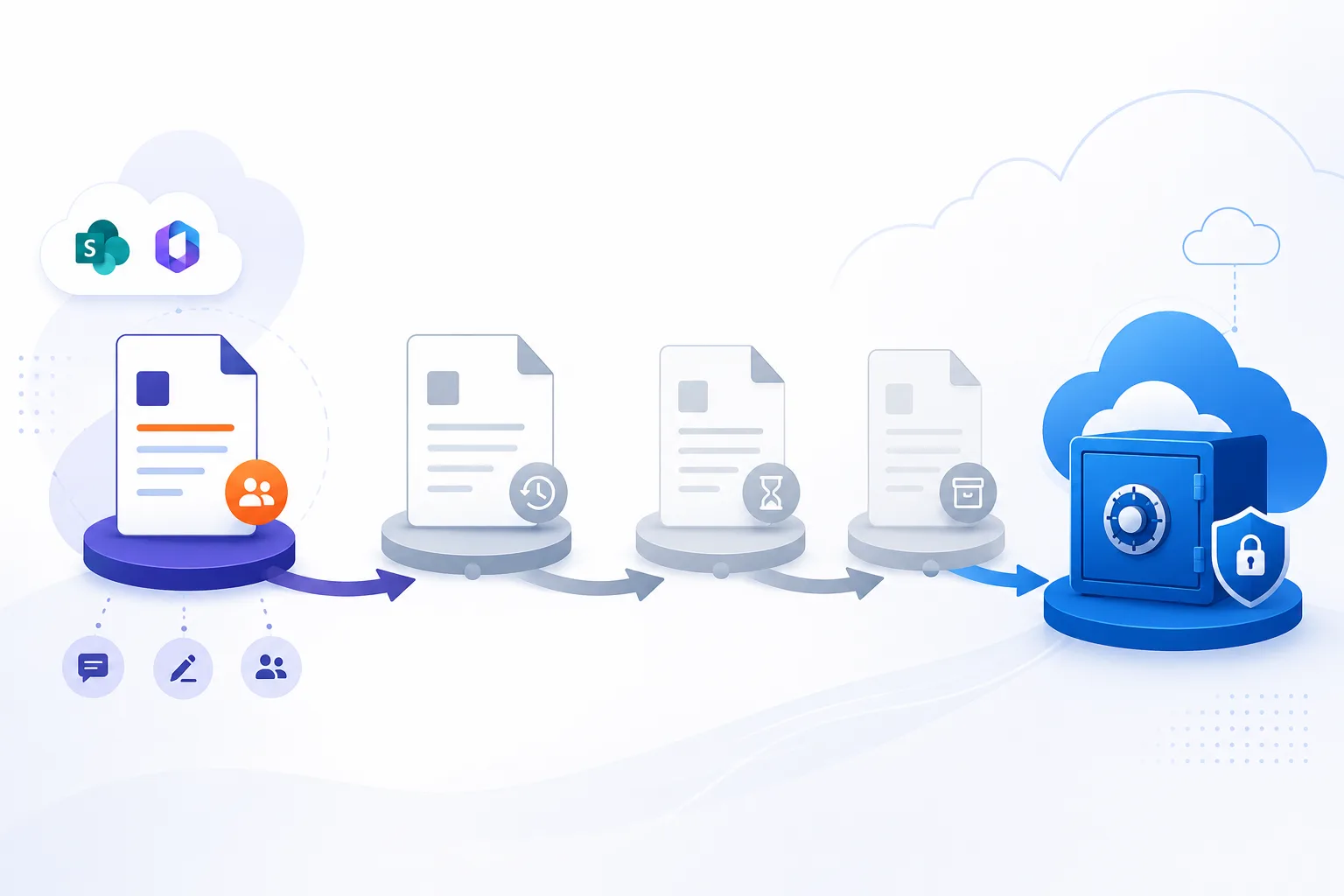
SharePoint document lifecycle is the end-to-end journey a document takes inside SharePoint Online - from creation and active collaboration through retention, archive, and eventual disposition. Every file in SharePoint sits somewhere on this lifecycle, whether the organisation manages it deliberately or lets it sit indefinitely in the active tier paying full storage cost.
A mature lifecycle strategy uses Microsoft's native tools (Microsoft Purview retention policies, retention labels, sensitivity labels) for the policy layer, and an automated archiving tool for the storage layer - moving inactive documents into cheaper tiers without breaking user access. Squirrel handles that storage tier by archiving inactive SharePoint Online documents into the customer's own Azure Blob Storage account.
This guide walks through the stages of a SharePoint document lifecycle, the Microsoft 365 tools that govern each stage, the gaps native tools leave open, and how a complete lifecycle strategy fits together.
The Stages of a SharePoint Document Lifecycle
Most SharePoint documents move through five distinguishable stages:
1. Creation
A user uploads a file or creates one in Word, Excel, PowerPoint, or another Microsoft 365 app. The document lands in a SharePoint Online document library, is indexed by SharePoint Search, and immediately becomes available to anyone with the right permissions.
2. Active collaboration
The document is opened, edited, co-authored, commented on, shared internally and externally, and surfaces in Microsoft Teams, OneDrive sync clients, and Copilot results. This is where the highest collaboration value is generated, and where the cost of fast SharePoint storage is justified.
3. Inactivity (the long tail)
For most enterprise content, active collaboration only lasts weeks or months. After that, the document sits in place. Users still find it through search or by navigating to it, but actual edits stop. In a typical SharePoint tenant, 70-90% of documents have not been touched in over a year, yet they consume the same expensive primary storage as everything else.
4. Retention and archive
Documents that are kept for compliance, legal, or business reasons enter a retention phase. Microsoft Purview retention policies and labels mark which documents must be preserved and for how long. At this point, two things matter: the document must remain accessible for audit and eDiscovery, but the cost of preserving it should not match the cost of an active, frequently-edited file.
5. Disposition
When retention requirements expire, the document reaches end of life - it is either reviewed and deleted, transferred to long-term records storage, or kept indefinitely under a new retention rule. Without disposition, the lifecycle never closes and storage costs compound forever.
The Microsoft 365 Tools That Govern Document Lifecycle
Microsoft provides a layered set of native tools for SharePoint document lifecycle management, primarily through Microsoft Purview:
- Retention policies and labels - define which documents must be preserved, for how long, and what happens at expiry (delete, review, keep). Applied at the site, library, or label level.
- Sensitivity labels - classify documents by confidentiality (Public, Internal, Confidential, etc.), which can drive different lifecycle behaviour for each class.
- Auto-labeling - automatically apply retention or sensitivity labels based on content, metadata, or location, without requiring user action.
- Records management - declare documents as records, locking them against edit or deletion for the retention period.
- Preservation Hold Library - SharePoint's hidden library that captures copies of files deleted or modified while under a retention policy, so the original is preserved for compliance.
- Disposition review - a Purview workflow that surfaces documents at the end of their retention period for human review before deletion.
Together, these tools cover the policy and compliance side of document lifecycle well. The gap they leave is the cost and storage side.
What Native Tools Don't Solve
Four well-known lifecycle gaps catch enterprises out when they rely only on Microsoft's built-in tools:
1. Cost of retained data
Retained documents still live in SharePoint Online primary storage. A document that has not been touched in five years but must be preserved for seven costs the same per gigabyte as one being actively edited today. There is no built-in tiering to cheaper cold storage inside SharePoint itself.
2. The Preservation Hold Library trap
When retention is enabled, deleting or modifying a document does not free storage - the preserved copy lands in the Preservation Hold Library, which is invisible to users but consumes the same expensive SharePoint quota. Aggressive cleanup campaigns often increase tenant storage because of this. See the Preservation Hold Library guide for the full mechanism.
3. No automated tiering across the long tail
Microsoft 365 has no native way to say "any document not opened in 2 years should move to cold storage, but stay accessible." Retention policies preserve content; they do not relocate it. Without a tiering layer, the long tail of inactive documents stays in the most expensive tier forever.
4. Disposition is manual
Disposition review surfaces individual documents at the end of retention, but for tenants with millions of files, manually reviewing each one is impractical. Most organisations either let everything default-delete (risking the loss of valuable content) or default-keep (which costs more storage forever).
How Squirrel Completes the SharePoint Document Lifecycle
Squirrel sits in the gap between Microsoft's retention layer and Microsoft's primary storage. It is the automated archive tier of the SharePoint document lifecycle:
- Lifecycle rules defined by administrators - rules based on document age, last access date, library, site, file type, or size. Squirrel evaluates the rules and moves matching files to Azure Blob Storage in the customer's own Azure subscription.
- Stub files for transparent access - when a document is archived, Squirrel leaves a small stub in SharePoint with the original name and metadata. Users see the file in its original location, search still finds it, and one click rehydrates the content for opening.
- Compressed and encrypted at rest - Squirrel compresses documents before upload, then stores them encrypted in Azure Blob Storage. SmiKar manages the encryption keys and provides each customer with a copy for independent access.
- Recycle Bin Capture - prevents the Preservation Hold Library from inflating by intercepting deletions before they trigger preservation copies. See the Recycle Bin Capture page for the mechanism.
- Audit trail for compliance - every archive, restore, and rehydration event is logged with timestamp, user, and outcome - feeding Microsoft Purview's audit pipeline for full lifecycle visibility.
Crucially, Squirrel does not replace Microsoft Purview. The retention policy still belongs to Purview. Squirrel handles the storage tier that Purview cannot relocate.
How to Build a Data Archiving Strategy
A data archiving strategy is the set of rules that decides what moves out of primary storage, when it moves, where it lands, and how you get it back. Four decisions cover most of it.
Everything else is implementation detail. Get these four wrong and no amount of tooling rescues the outcome.
Decide what counts as inactive
Start from evidence rather than instinct. Last-modified date is the usual signal, and 24 to 36 months is where most enterprises land, but the threshold matters less than applying it consistently and being able to defend it later.
Combine the date rule with file type and library path so the policy is precise. Engineering drawings and completed project archives age differently from a live contracts library, and a single blanket rule across both produces either over-archiving or no useful saving.
Audit before you set the rule. If a scan shows a third of your tenant is untouched video from four years ago, that tells you where the threshold should sit far better than a round number does.
Decide where the archived data lands
This is the decision people revisit most and regret most. The options divide by who owns the storage account.
Archiving into a vendor's platform is simpler to start and means your data sits somewhere you do not control, under commercial terms that can change. Archiving into your own cloud storage means you keep ownership, choose the region, and can walk away from the vendor without a migration project.
For regulated estates the second usually wins on data residency grounds alone, because you can point an auditor at the subscription and the region rather than at a contract.
Decide how retention survives the move
An archiving strategy that breaks compliance is worse than no strategy. Three things have to hold after content moves.
Retention policies must continue to apply to archived content, so a document under a seven-year rule is still under it in the archive. Legal holds must reach archived material without a restore, or eDiscovery becomes a manual exercise. And metadata, permissions and classification labels must survive the round trip, because a document that comes back stripped of its sensitivity label has become a different risk.
Test this with a real hold on real archived content before the policy goes anywhere near production.
Decide how content comes back
The recovery path determines whether the strategy survives contact with users. Two questions settle it.
Can an end user restore without raising a ticket? If not, your helpdesk absorbs the cost you saved on storage, and the saving is illusory.
What does retrieval cost in fees and in delay? Some archives charge per restore, which creates an incentive not to retrieve content, which quietly defeats the point of keeping it.
The reference pattern
For a large enterprise on Microsoft 365, a complete strategy usually maps out like this:
| Lifecycle stage | Tool | What it handles |
|---|---|---|
| Creation and classification | Microsoft Purview sensitivity labels | Auto-applies classification at creation |
| Active collaboration | SharePoint Online primary storage | Fast access for current work |
| Inactivity | Squirrel lifecycle rules | Moves inactive docs to Azure Blob Storage with stub files |
| Retention | Microsoft Purview retention policies | Enforces preservation for required period |
| Preservation Hold Library prevention | Squirrel Recycle Bin Capture | Intercepts deletions before they inflate PHL |
| Disposition review | Microsoft Purview disposition workflow | Surfaces records for human review |
The result: compliance requirements are met via Purview, storage costs are controlled via Squirrel, and the long tail of inactive content does not silently consume tenant quota year after year.
Why Document Lifecycle Management Matters for Storage Cost
Most SharePoint storage cost is generated by content that no one is editing. A typical enterprise tenant breakdown:
- Hot, actively-edited content: 5-15% of total volume.
- Inactive but still relevant: 60-70% of total volume - documents that are not being edited but are occasionally referenced or required for retention.
- Preservation Hold Library content: 5-20% of total volume - silently growing under retention policies.
- Other (versioning, recycle bins, system content): the remainder.
A lifecycle strategy that moves the inactive 60-70% into Azure Blob Storage tiers, and prevents PHL from inflating, typically reduces SharePoint storage spend by 60-85% - while preserving full user access through stub files.
Next steps
Frequently Asked Questions About SharePoint Document Lifecycle
What is a data archiving strategy?
The set of rules deciding what leaves primary storage, when, where it goes, and how it comes back. In practice it is four decisions: what counts as inactive, whose storage account holds the archive, how retention and legal holds continue to apply after the move, and whether an end user can retrieve content without raising a ticket. The tooling follows from those answers rather than driving them.
How is a data archiving strategy different from a retention policy?
A retention policy says how long content must be kept and blocks deletion before that point. It says nothing about where the content lives or what it costs, so retained documents sit in primary storage at full price. An archiving strategy decides placement and cost. The two work together: retention defines the obligation, archiving decides where the obligation is met.
What is SharePoint document lifecycle management?
The discipline of managing a SharePoint document across its full journey - creation, active collaboration, inactivity, retention, and disposition. It combines policy controls (Microsoft Purview), classification (sensitivity labels), and storage tiering (third-party archiving tools like Squirrel) to keep documents accessible and compliant at the lowest possible cost.
What is the difference between document lifecycle and retention?
Retention is one stage of the lifecycle - the policy that determines what must be preserved and for how long. The lifecycle covers the full journey including creation, collaboration, archiving, and disposition. Retention policies preserve content; lifecycle management decides where it lives at each stage.
Does Microsoft Purview manage SharePoint document lifecycle?
Microsoft Purview handles the policy layer of document lifecycle - retention rules, sensitivity labels, records declarations, and disposition workflows. It does not relocate documents to cheaper storage tiers; for that, organisations use third-party archiving tools that integrate with Purview's policies.
How does Squirrel fit into SharePoint document lifecycle?
Squirrel handles the storage layer of lifecycle. Once a document is identified as inactive (by age, last access, or admin-defined rules), Squirrel archives it to Azure Blob Storage in the customer's own subscription, leaving a stub file in SharePoint for transparent user access. It complements Purview's retention policies rather than replacing them.
What is the role of the Preservation Hold Library in document lifecycle?
The Preservation Hold Library is SharePoint's hidden retention copy store. When retention is enabled, deleted or modified documents are preserved in the PHL invisibly to users, consuming the same SharePoint storage as primary content. It is necessary for compliance but unmanaged it inflates tenant storage cost dramatically. See what is the Preservation Hold Library in SharePoint.
Can I automate SharePoint document lifecycle without code?
Yes. Microsoft Purview retention policies handle preservation, labels and auto-labeling handle classification, and Squirrel's admin-defined lifecycle rules handle archiving. None of these require custom code; all are configured in the relevant admin centres or product portals.
What happens to a document at the end of its lifecycle?
Disposition. The document is either reviewed for deletion (via Purview disposition review), permanently deleted, or transferred to long-term records storage under a new retention rule. A mature lifecycle strategy makes disposition automatic for low-risk content and manual for high-risk records.
How is SharePoint document lifecycle different from email lifecycle?
Email lifecycle is managed through Exchange Online and Exchange Online Archiving - in-place archive mailboxes plus Purview retention. SharePoint document lifecycle deals with files in document libraries and uses different storage and tooling. Both lifecycles overlap at the policy layer (Purview) but diverge at the storage layer.
Does Squirrel break Microsoft Purview retention policies?
No. Squirrel archives content under existing retention rules; the retention period remains enforced through the stub file and Squirrel's audit trail. Disposition review continues to operate on the stub-represented documents, and rehydration restores the original content unchanged.
Related Guides on SharePoint Lifecycle and Archiving
- Preservation Hold Library in SharePoint - the hidden storage trap retention creates, and how Squirrel prevents it.
- SharePoint archiving vs deletion - when to archive, when to delete, and how the two interact.
- What does archiving mean? - the foundational concepts behind enterprise data archiving.
- Squirrel - SharePoint Online archiving - the product that handles the storage tier of document lifecycle.
- Mastering SharePoint document archiving - the deeper operational guide to archive workflow.
Talk to SmiKar About SharePoint Document Lifecycle
If Microsoft Purview is handling your retention policies but storage costs are still climbing, the gap is in the lifecycle's storage tier - inactive content is sitting in expensive SharePoint storage because there is nowhere cheaper for it to go. Squirrel closes that gap.
Mark Smith co-founded SmiKar Software in 2015 and has spent the past decade helping organisations solve Microsoft 365 data management challenges. He works with the SmiKar team to build solutions for SharePoint archiving, storage optimisation, governance and compliance, supporting customers from growing businesses through to Fortune 500 enterprises.
More about SmiKar